Components factory: trucks, forklifts and AMRs
Are the trucks waiting on the forklift or on the AMRs? See which extra vehicle gets them off the docks sooner.
No sign-in needed: open it in Studio, inspect the saved results and edit in 2D and 3D. Sign in to connect your own AI; project files remain free. Check Account for execution access. Opening asks before replacing your current space.
Before a layout change or a fleet order: does one more AMR or one more forklift get the trucks off the docks sooner?
- Who uses it
- Production engineers and plant logistics planners
- How it can create value
- Screen fleet sizes on the same truck schedule and production plan before leasing vehicles or moving docks. Here every pallet move falls on one forklift: a third AMR leaves the trucks waiting just as long, a second forklift cuts their time at the docks by about two thirds. Shorter dock times only save money if detention charges, overtime or leased vehicles actually fall.
- Bring your site data
- Truck appointments and pallets per truck, measured forklift pick-up, set-down and drive times, inspection times, the production orders and cell lot times, AMR speeds and the routes on your floor plan. Vehicle traffic and avoidance, AMR charging, stock levels and breakdowns are outside this example.
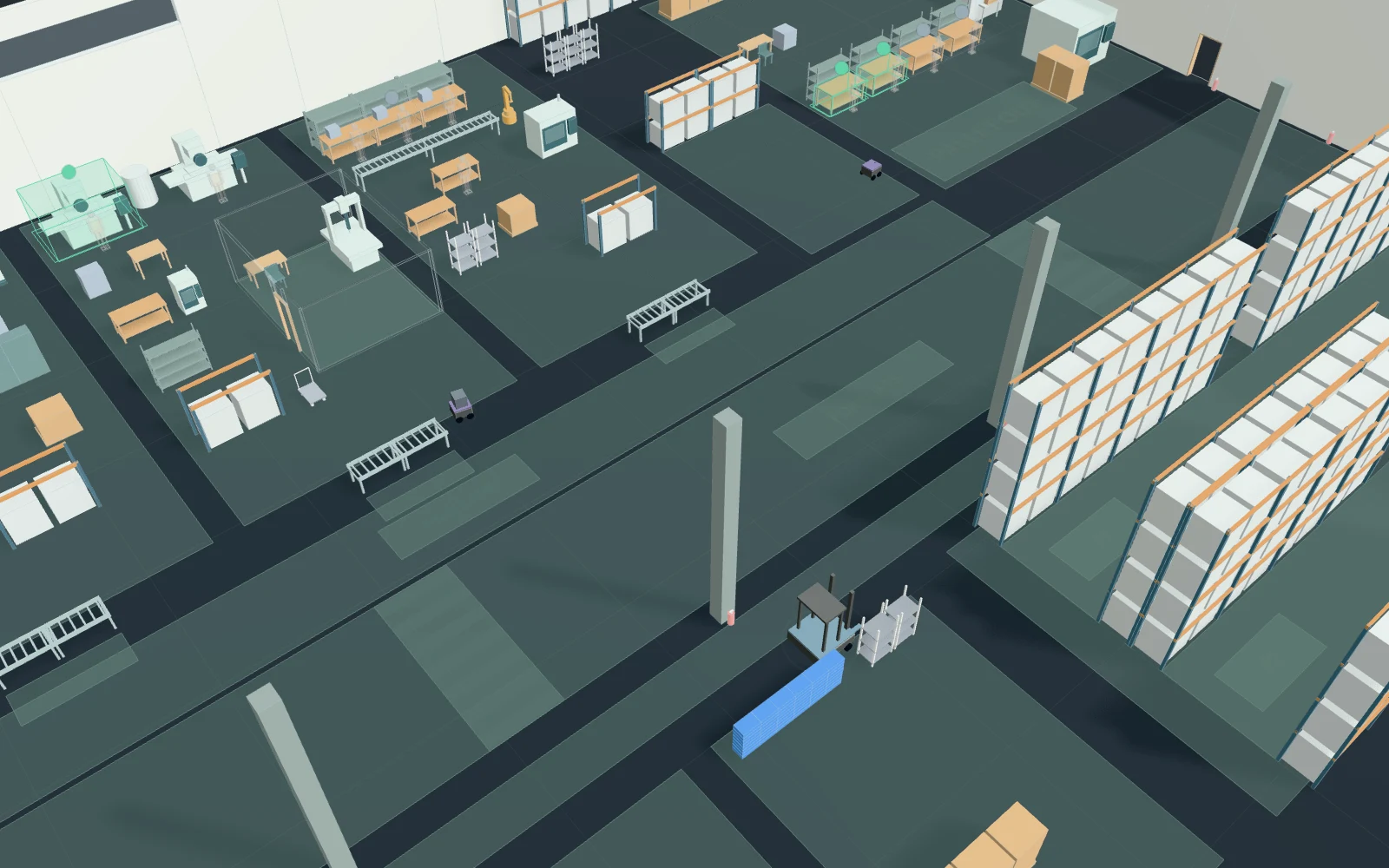
A model you can inspect.
6:00–8:00 plus an hour to finish. Six inbound trucks bring 6 pallets each, three outbound trucks take 6; each stays at its dock until done. Forklifts make every pallet move: unload, put away after inspection (1–4 min), refill the supermarket every 10 min, store finished pallets, load trucks (20 s per pick-up or set-down). Two of four AMRs take 48 totes to the free one of five cells (6.4–11.2 min) and on to packing (six cartons a pallet). No traffic avoidance, charging, stock, breakdowns or breaks; assumed figures.
Change one thing
Compare 2 AMRs · 1 forklift with 3 AMRs · 1 forklift and with 2 AMRs · 2 forklifts on the same trucks and orders; then try 25 s pallet handling or 7 pallets a truck.
Read the consequence
Truck time at the receiving and shipping docks, docks shown blocked while a truck waits for the forklift, forklift and AMR utilization, the inspection queue and when the last job finishes. Vehicle traffic, charging and breakdowns are not modelled.
View the starting inputs
- AMRs (of 4)
- 2
- Forklifts
- 1
- Pallets per truck
- 6
- Pallet pick-up or set-down (s)
- 20
- Order interval (s)
- 150
- Cell lot time (s)
- 480
Agent counts, routes and resource definitions are also saved in the project JSON.
The same demand. A different capacity.
One run, seed 7. Observation window 180 minutes. Arrivals, geometry and the seed set stay the same in every option.
| Scenario | Completed | Mean wait | Mean cycle | Blocked |
|---|---|---|---|---|
| 2 AMRs · 1 forklift | 131 | 16m 04s | 22m 58s | 0 |
| 3 AMRs · 1 forklift | 131 | 16m 03s | 22m 56s | 0 |
| 2 AMRs · 2 forklifts | 131 | 4m 47s | 11m 40s | 0 |
Waiting averages cover arrived jobs, including unfinished waits; cycle averages cover completed jobs only. These are synthetic calculations, not measured site performance, revenue or a safety assessment.
Engine, status and output notes
process-des-2.7.0. Status: 2 AMRs · 1 forklift: completed; 3 AMRs · 1 forklift: completed; 2 AMRs · 2 forklifts: completed. “Completed” is the engine run status, not success for every job. Check blocked jobs and warnings.
- No engine warnings.
Engine inputs and saved comparisons stay with the saved project. Any limited trace affects playback details, not aggregate metrics.
Plan in 2D. Inspect in 3D. Keep the whole project.
- Open and adjust. Switch between 2D and 3D; edit a part, a floor or an input. Both views describe the same model.
- Connect your agent for free. Sign in, choose Connect AI and connect ChatGPT, Claude, Codex or Claude Code. Ask it to inspect the example, edit the layout and check a route.
- Save a checkpoint. Project → Project file, or ask the agent to export the complete project. Import it later to restore floors, scenarios, saved comparisons and the selected view.
- Compare options. Run new operational comparisons under the same demand. Check Account for execution access, built-in AI and manual cloud-saving limits.