Hospital morning specimen round
See whether a third delivery robot or a lift rule gets the morning blood specimens to the lab sooner.
No sign-in needed: open it in Studio, inspect the saved results and edit in 2D and 3D. Sign in to connect your own AI; project files remain free. Check Account for execution access. Opening asks before replacing your current space.
Do we need a third delivery robot, or a lift rule that keeps the service lift free for the robots during the morning specimen round?
- Who uses it
- Hospital facilities and logistics managers, nursing and laboratory management
- How it can create value
- Before buying a robot or changing the lift rules, see how long specimens take to reach the lab, whether the last box arrives before the morning analysis run, and what each option moves onto the bed lift and the porters. Faster delivery alone does not establish earlier results or savings; weigh it with the lab’s own processing, the robot’s cost and the effect on bed transfers.
- Bring your site data
- Specimen, medicine and supply runs by ward and time of day, measured loading and unloading times (including nurses coming to the robot), robot speed and docking, the lift’s speed, door times and control, the meal trolley and bed transfer schedules, and the lab’s cut-off time. Check the lift’s real dispatch and the robot vendor’s fleet rules before deciding.
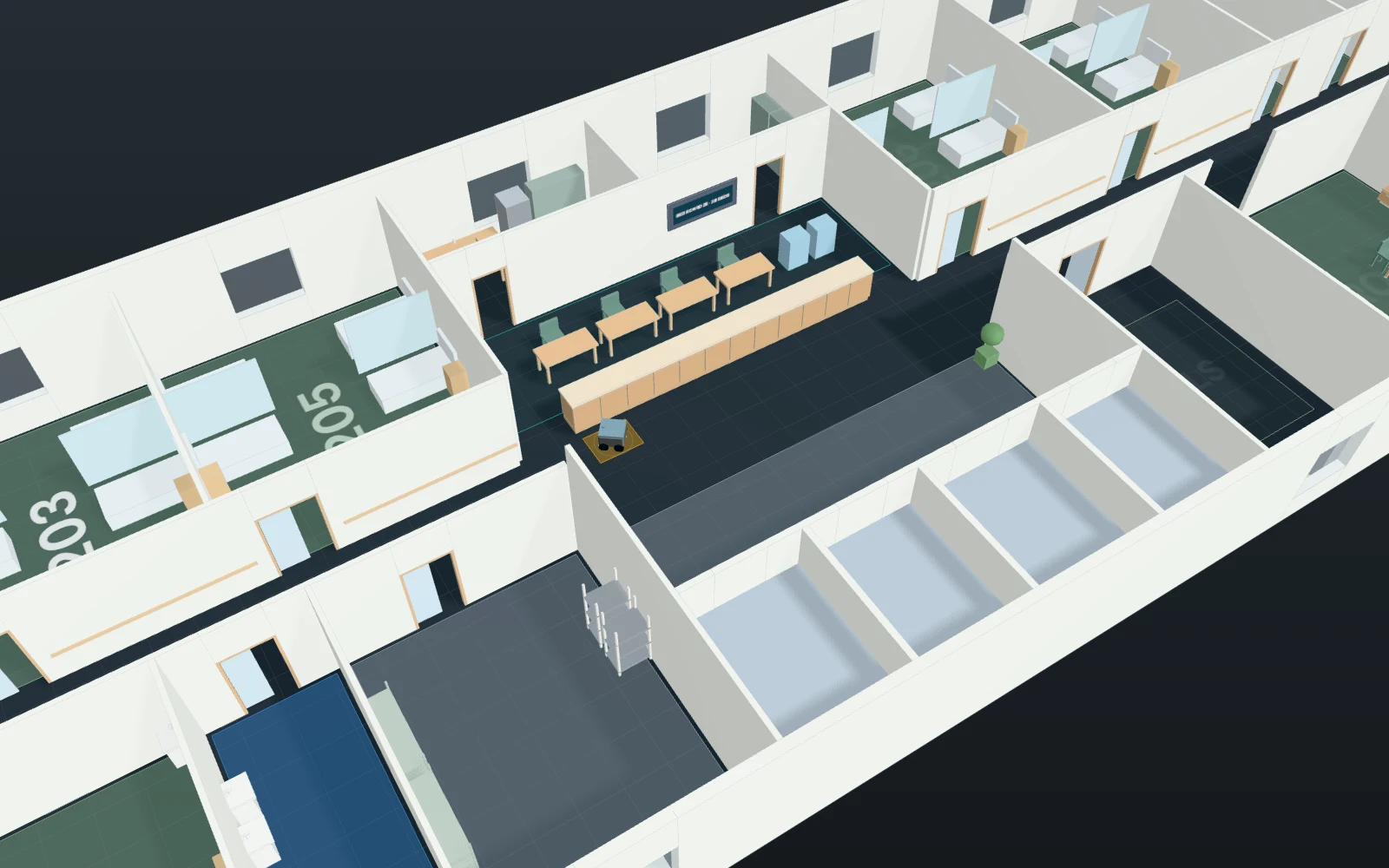
A model you can inspect.
A weekday morning from 6:30 in a hospital wing of five storeys. Each of the four wards (2F–5F) has a box of blood specimens ready for the 1F laboratory every 15 minutes from 6:35 (6 boxes a ward, the wards 3 minutes apart); the pharmacy sends each ward its morning medicines at 7:00 and the day’s injections at 7:50, and the stores one cart of supplies at 6:50. Two delivery robots (0.8 m/s) make every run: the nearest free robot drives from its bay to the sender, is loaded in 60 s, rides the service lift (lift 4) alone, is unloaded in 40 s (specimen boxes take turns at the lab’s one reception window) and goes back to its bay, busy until it is there. The service lift has one car (0.75 m/s, 8 s of doors and 4 s open at a stop, 5 s for each rider in or out) that takes one robot or one trolley at a time and follows simple fixed collective rules; it also carries 12 breakfast trolleys up from 7:10 and down with the trays from 8:10. Porters take six patients on beds to X-ray and back by the bed lift (lift 3). Specimen-to-lab time runs from the box being ready to the lab taking it. Compare a third robot with keeping the service lift for the robots (the trolleys then take the bed lift). Synthetic times and volumes. Not modelled: robot charging and faults, doors and corridor traffic between robots and people, priority calls, passenger lift traffic, nurses’ availability beyond the fixed loading time, pneumatic tubes or carrying by hand, specimen stability limits, costs.
Change one thing
With the same morning, compare 2 and 3 robots; then keep the service lift for the robots by sending the meal trolleys by the bed lift (0); or send fewer, larger specimen boxes (every 20 or 30 minutes).
Read the consequence
Specimen-to-lab time and when the last box reaches the lab, robots and trolleys waiting at the lift 4 landing, each robot’s runs, and the bed lift’s waits when the trolleys move to it. The lift follows simple fixed rules (no priority call for robots, no group control); charging, faults and corridor traffic are not modelled.
View the starting inputs
- Delivery robots
- 2
- Specimen boxes per ward
- 6
- Time between a ward’s specimen boxes (s)
- 900
- Loading a robot at the ward, pharmacy or stores (s)
- 60
- Unloading at the lab or the ward (s)
- 40
- Meal trolleys per ward
- 3
- Meal trolleys by the service lift (1) or the bed lift (0)
- 1
Agent counts, routes and resource definitions are also saved in the project JSON.
The same demand. A different capacity.
One run, seed 7. Observation window 180 minutes. Arrivals, geometry and the seed set stay the same in every option.
| Scenario | Completed | Mean wait | Mean cycle | Blocked |
|---|---|---|---|---|
| 2 robots · service lift shared with meal trolleys | 66 | 8m 47s | 12m 51s | 0 |
| 3 robots · service lift shared | 66 | 3m 22s | 7m 27s | 0 |
| 2 robots · service lift kept for robots (trolleys by bed lift) | 66 | 3m 45s | 7m 52s | 0 |
Waiting averages cover arrived jobs, including unfinished waits; cycle averages cover completed jobs only. These are synthetic calculations, not measured site performance, revenue or a safety assessment.
Engine, status and output notes
process-des-2.7.0. Status: 2 robots · service lift shared with meal trolleys: completed; 3 robots · service lift shared: completed; 2 robots · service lift kept for robots (trolleys by bed lift): completed. “Completed” is the engine run status, not success for every job. Check blocked jobs and warnings.
- No engine warnings.
Engine inputs and saved comparisons stay with the saved project. Any limited trace affects playback details, not aggregate metrics.
Plan in 2D. Inspect in 3D. Keep the whole project.
- Open and adjust. Switch between 2D and 3D; edit a part, a floor or an input. Both views describe the same model.
- Connect your agent for free. Sign in, choose Connect AI and connect ChatGPT, Claude, Codex or Claude Code. Ask it to inspect the example, edit the layout and check a route.
- Save a checkpoint. Project → Project file, or ask the agent to export the complete project. Import it later to restore floors, scenarios, saved comparisons and the selected view.
- Compare options. Run new operational comparisons under the same demand. Check Account for execution access, built-in AI and manual cloud-saving limits.