Start from the office floor model (free sign-up; running a simulation needs Pro). When there never seem to be enough meeting rooms, you cannot tell whether there are too few rooms or they are used badly without counting a day’s meetings. In this article, your AI writes a day of meetings for a mock 64-desk office and compares different ways of using the rooms. It ran the same tools an AI calls over MCP. Every figure and number below comes from that run.
1. The office and its rooms
The mock office is a floor of eight desk islands for eight (64 desks), with meeting rooms A (8 people), B (6) and C (4), two phone booths and the pantry along the south side. Your AI reads the three rooms (where people stand in each: the spot nearest its middle, 35 cm clear of the furniture) and the booths with get_space, and writes this scenario (put_process_scenario):
- From 9:00 to 17:00, meetings come up at random, 4 an hour on average: 40 % of two people, 35 % of three or four, 15 % of five or six and 10 % of seven or eight.
- A meeting takes a free room it fits in. Today the largest goes first (A, B, then C). With no room free it waits up to 10 minutes; then it is held at the desks or put off (a meeting that found no room).
- A meeting lasts 20 to 90 minutes, most often 30.
- One-person web calls come up 4 an hour on average (10 to 60 minutes, most often 20) and take a phone booth. With both booths taken, a call takes the smallest free meeting room, and with no room free it is made at the desk.
- Twenty runs, with different random numbers.
The meetings an hour, how a room is chosen, whether web calls may take a meeting room, the phone booths, the longest a meeting may last and a movable wall in room A (closed, meetings of four or fewer use half of it each) are the scenario’s parameters. With sweep_process_parameters, your AI runs the same twenty random runs at each combination. Bookings are not modelled (a meeting looks for a free room when it starts), nor the rush to book ahead.
2. A day today
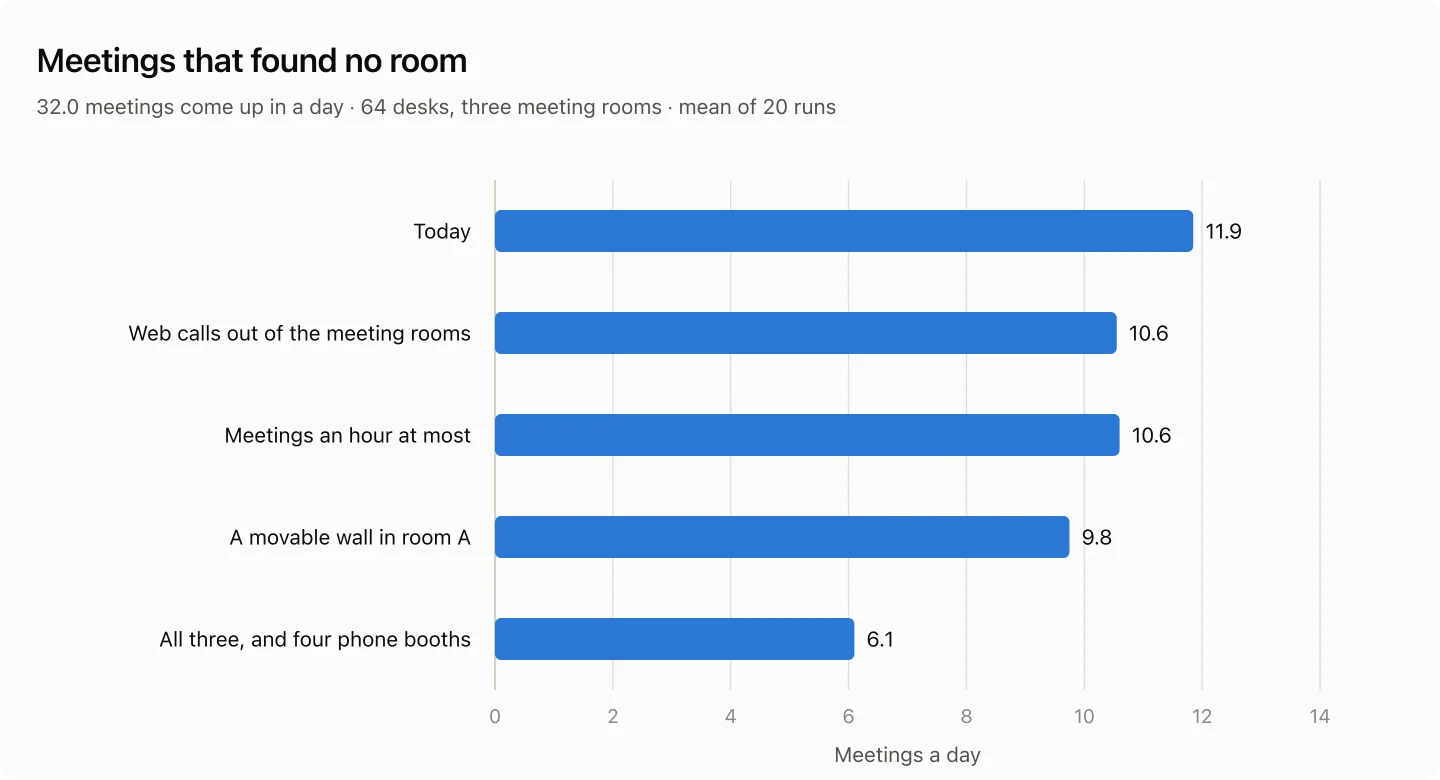
32.0 meetings come up in a day on average over the 20 runs, and 11.9 of them (37.1 %) find no room. Room A was in use for 6.8 hours, B for 6.0 and C for 5.5. Of 30.6 one-person web calls, 5.4 took a meeting room and 6.6 were made at the desk.
- A meeting lasts 46.7 minutes on average. Four an hour take 186.7 minutes, 104 % of the three rooms’ 180: there is not enough room time to begin with.
- 59.0 % of the meetings in room A were of four people or fewer: small meetings fill the room for eight.
3. Using the rooms differently
| How the rooms are used | Meetings with no room | Meetings of 7–8 | Web calls at the desk |
|---|---|---|---|
| Today | 11.9 | 2.0 | 6.6 |
| Web calls out of the meeting rooms | 10.6 | 2.2 | 12.0 |
| … and four phone booths | 10.6 | 2.2 | 2.9 |
| Meetings an hour at most | 10.6 | 2.1 | 5.5 |
| A movable wall in room A | 9.8 | 2.6 | 4.6 |
| The smallest free room first | 11.9 | 1.9 | 6.7 |
| All three (web calls, an hour, the wall) and four phone booths | 6.1 | 2.2 | 2.9 |
Meetings or calls a day (mean of 20 runs).
- With one-person web calls kept out of the meeting rooms, the meetings that find no room go from 11.9 to 10.6. The calls made at the desk grow to 12.0, but with four phone booths they are 2.9 (where to put the booths is not drawn).
- With meetings an hour at most, 10.6 find no room: a meeting lasts 36.7 minutes on average, 146.7 minutes an hour (81 % of the three rooms).
- With a movable wall in room A, so that meetings of four or fewer each use half of it, 9.8 find no room. In exchange, meetings of seven or eight cannot get in while either half is used, and go from 2.0 to 2.6.
- Taking the smallest free room first leaves 11.9: meetings of seven or eight drop a little, to 1.9, but small meetings find rooms less often. When the room time is short, how rooms are chosen does not change the total.
- All three together with four phone booths leave 6.1 (about half of today), compared on a copy of the scenario (
update_process_parameterswithcopyAs). Six meetings a day still find no room: holding every meeting in a room means more rooms.
4. With more or fewer meetings
| Meetings an hour | Meetings a day | Meetings with no room |
|---|---|---|
| 3 | 23.2 | 6.8 (29.3 %) |
| 4 (today) | 32.0 | 11.9 (37.1 %) |
| 5 | 39.6 | 18.1 (45.7 %) |
5. How to use these numbers
- The meetings a day, their sizes and lengths come from your booking system or calendars. Comparing the total meeting time with the rooms × the hours tells you whether the rooms are too few or used badly.
- Not calculated: the rush to book ahead and rooms booked but not used, each room’s equipment (screens, video conferencing), meetings with visitors, effects on revenue or productivity.
- When adding meeting rooms or phone booths, check the passages and doors on the plan (
check_space).