Compare layout options for an existing office and hand over the drawings
A designer or facility team rarely redraws an office from scratch: the core, columns and escape route stay, the headcount changes, and the client comments on each issue. This page follows that work in order, input, comparison, revision and handover, using three published records made with Laydyne over MCP. The floor, the company and the client are synthetic; no real office was measured.
The comparison opens without sign-in or AI connection and keeps your current browser work.
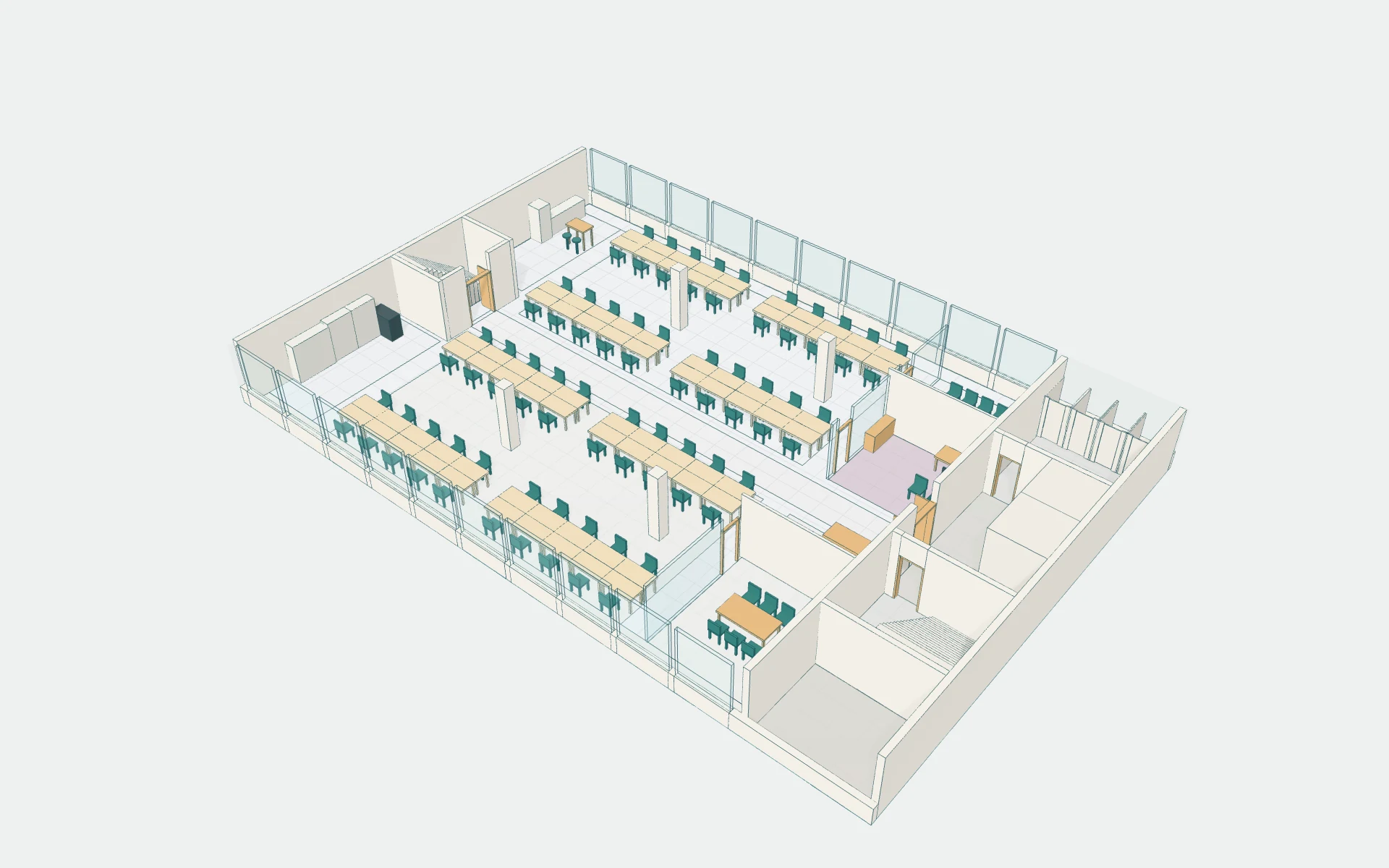
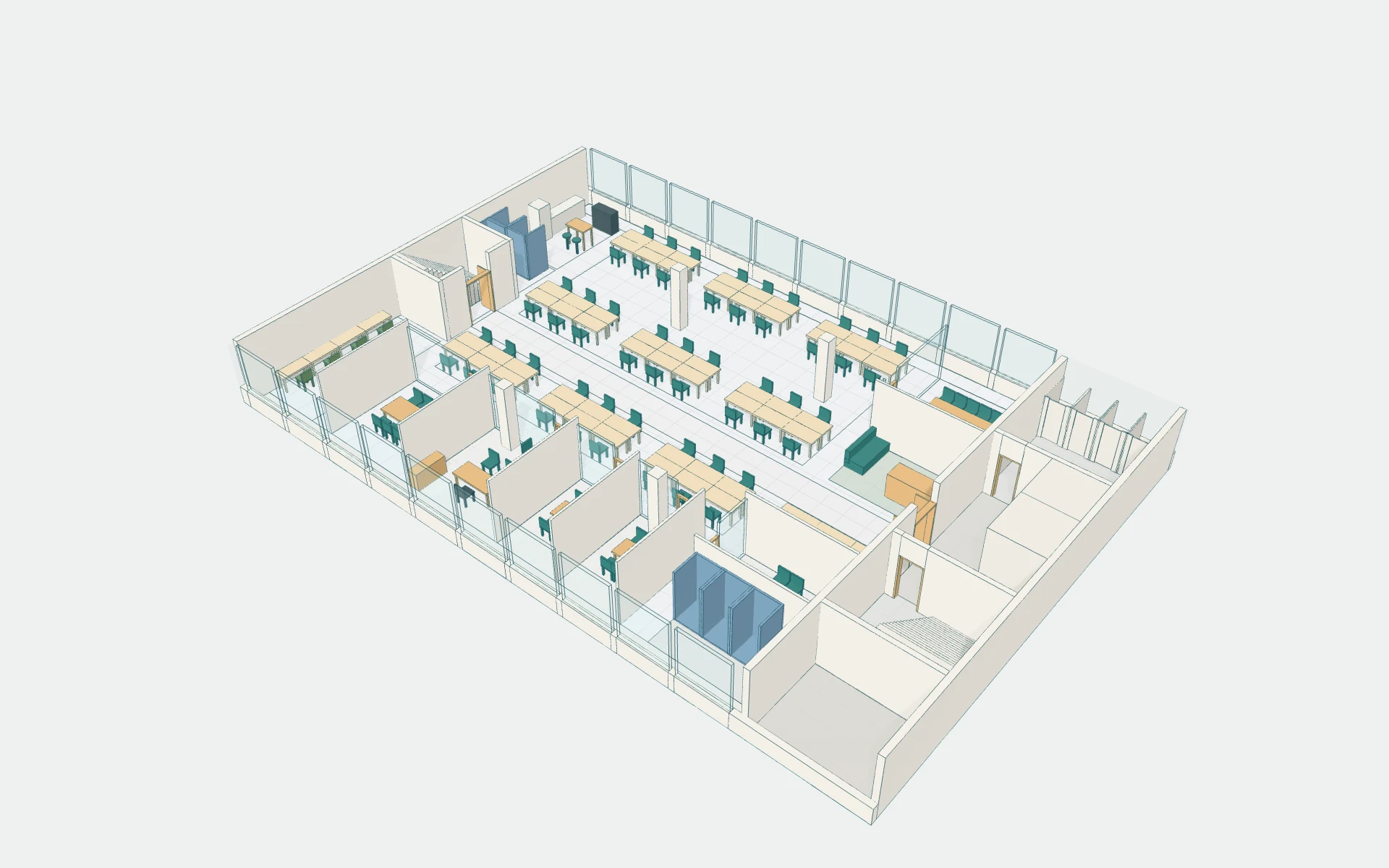
Input, compare, revise, hand over
1 Input
Start from the floor that cannot change
The record keeps the service core, the escape stair, four columns and the glazed facades fixed, and writes the brief down: an 80-person company, hybrid attendance, more meeting rooms and places for calls. The brief and the existing layout A are the starting point; the dimensions were given, not surveyed.
2 Compare
Put two layouts in the same view and read the difference
B replaces 80 fixed desks with 54 shared desks, six meeting rooms, six phone booths and seven focus seats. A and B are saved in one project, so the same viewpoint shows both and a change drawing lists what was added, removed or moved. On the same assumed day over 20 paired seeds, waiting per arriving person fell from 16.55 to 2.91 minutes. The six purpose-based layouts take the same floor towards quiet work, teamwork, studios, a client forum and window-side desks.
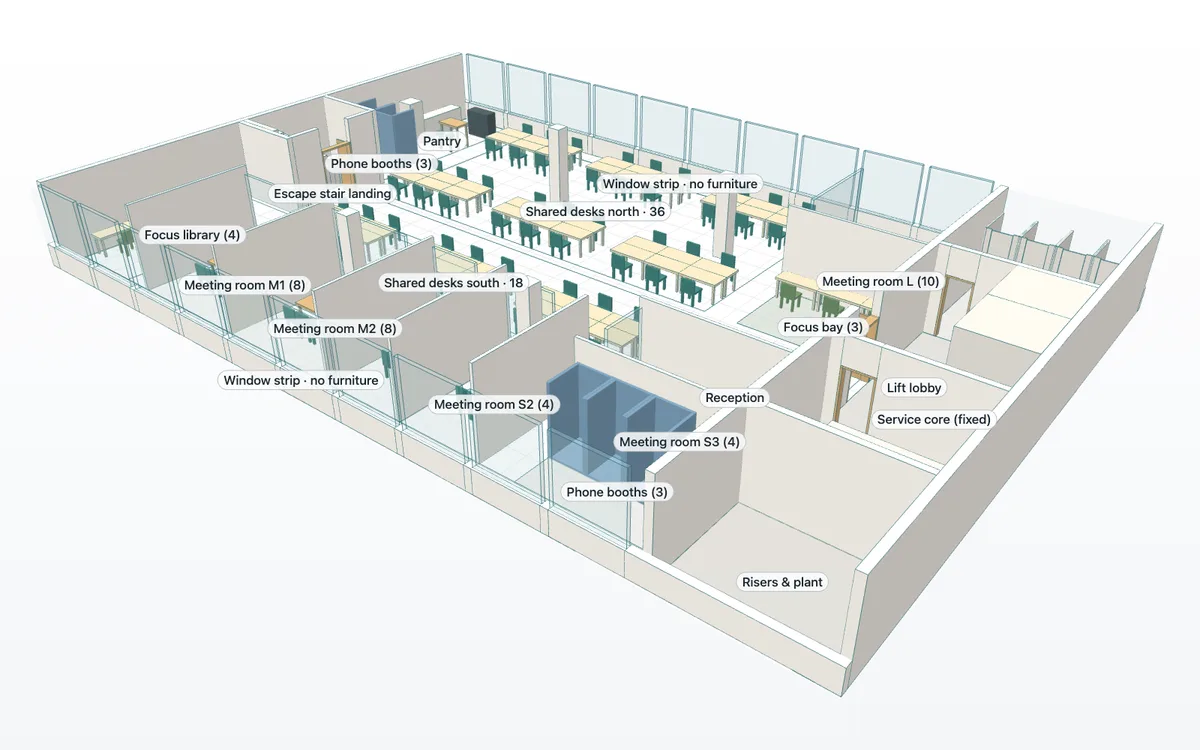
B · The proposal: 54 shared desks, six meeting rooms, six phone booths and seven focus seats. 3 Revise
Apply the client’s comments without losing the proposal
The client asked to keep one director’s office and move reception beside the entrance. R02 makes those changes while B stays saved, and the change drawing from B to R02 shows only what moved. Waiting rose by 1.34 minutes from B and stayed 12.30 minutes below A, so the trade-off is recorded rather than hidden. The drawing revisions record shows the same cycle on a three-floor fit-out: Rev A issued, comments applied, Rev B issued with the changes clouded, and Rev A reopened as sent.
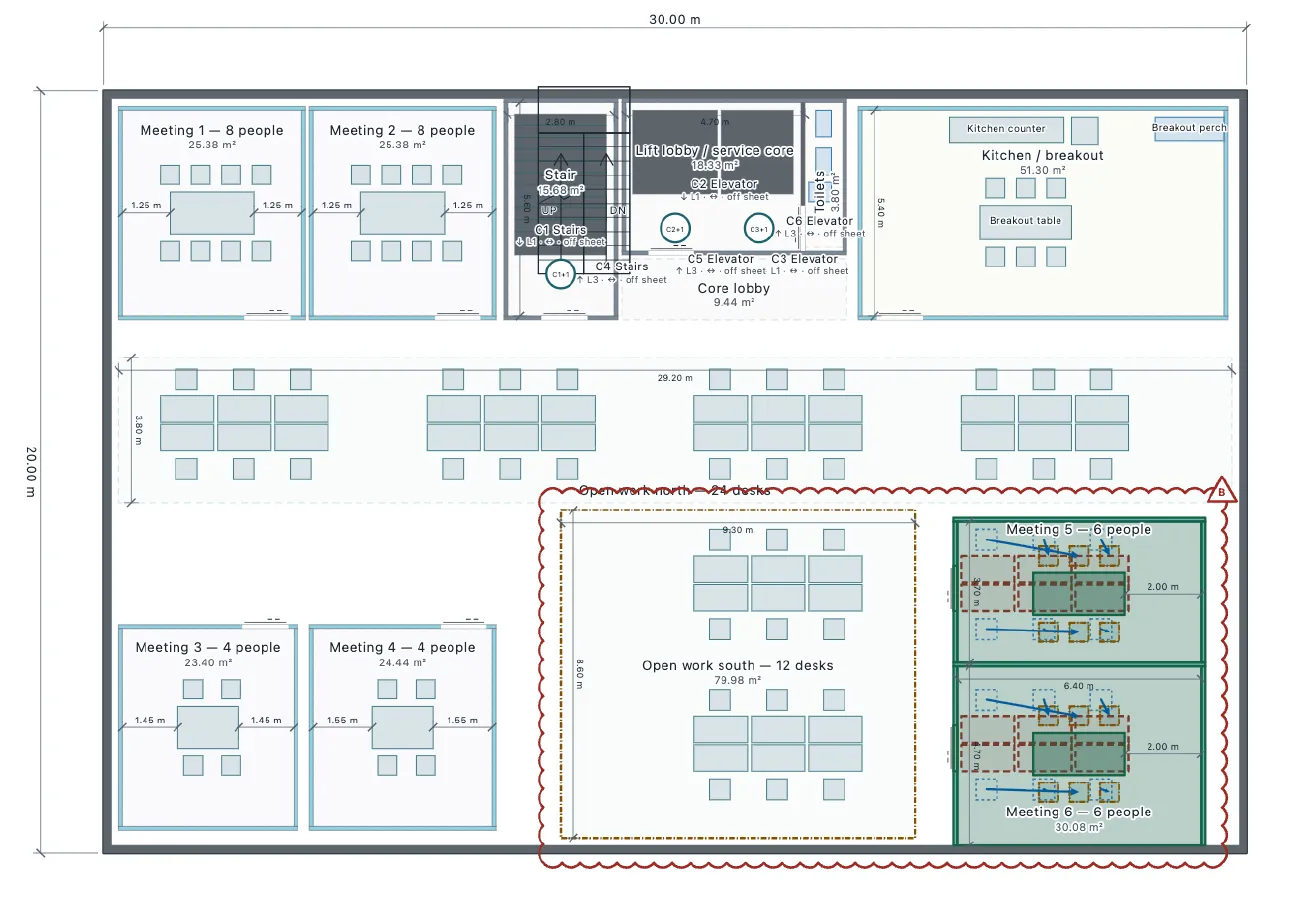
Clouded changes and a revision table on a Rev B sheet, from the drawing revisions record. 4 Hand over
Issue plans, quantities and the report from one saved version
The R02 handover is an A3 plan at 1:100 with furniture references, four quantity sheets with part IDs and dimensions, and a searchable proposal report that keeps the comparison and its assumptions. The version in the title block matches the saved layout, and the editable project reopens with A, B, R02 and their comparisons intact.
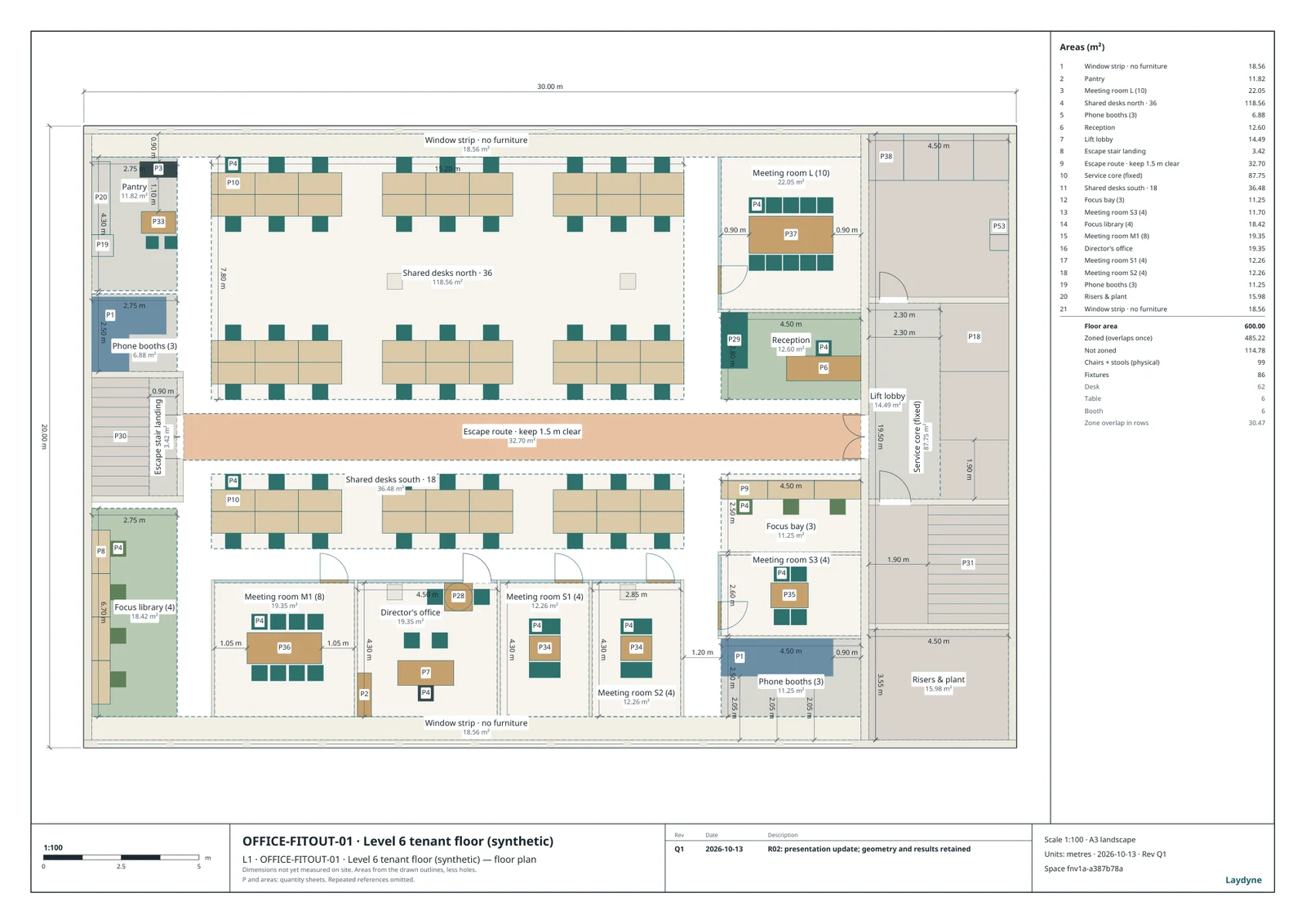
R02 submission plan, A3 at 1:100. The PDF below carries the full-size sheet and the quantity sheets.
Start with this conversation.
Example requests for your own MCP agent or the built-in assistant. Review the inputs before running a simulation; check Account for built-in AI access.
Model the floor and keep the current layout
Model this existing office floor and save its current layout as A. Keep the core, columns, windows and the 1.5 m escape route fixed. Then propose B with shared desks, more meeting rooms, phone booths and focus seats, and show me both from the same viewpoint.
Apply the client’s comments
The client wants one director’s office kept and reception beside the entrance. Make that change as R02, keep B saved, and show me what was added, removed or moved.
Issue the handover
Issue R02 as an A3 plan at 1:100 with furniture references, the quantity sheets and the proposal report as PDF, from the same saved version, and tell me which numbers are still assumptions.
With a free account, creating and editing with your own MCP agent is free in Laydyne; your AI provider charges separately. Check Account for execution access and current limits. These are suggested requests, not a recorded AI session.
Download the drawings, quantities and project
The files are the published records’ own: the same version as the plans the client saw. Downloads keep the report’s original language; the editable project opens in Studio. This synthetic example does not certify a real office.
Read the full records
Give AI the inputs that matter
The synthetic floor is 30 × 20 m, 600 m², with a service core on the east, a west escape stair, four columns on a 7.5 m grid and glazed north and south facades. The company has 80 people with hybrid attendance. Confirm these inputs with the agent:
- Which parts are fixed: core, columns, facades, the escape route and the entrance. The rest is a layout choice.
- Headcount, expected attendance and how people meet, call and focus. The published comparison assumes 48 people a day, or 60% of 80, as a synthetic input.
- The client’s comments as they arrive, so each revision is saved beside the layout it changes.
Ask AI to compare the options
- Save the current layout as A and the proposal B in one project. Open both from the same saved viewpoint and read the change drawing between them.
- Compare the same assumed day on A, B and R02 with 20 paired seeds, keeping waiting, room bookings and desk shortages separate.
- Apply the client’s revision as R02 without overwriting B, and check passages and the escape route again.
- Issue the drawings, quantities and report from the saved version, with the version in the title block, so the client reviews the layout they were shown.
Read the result
The model can report:
- Same-view 3D images and A3 plans at 1:100 of A, B and R02, with change drawings between them.
- Quantity sheets with part IDs and dimensions, and a proposal report that keeps the comparison and its assumptions.
- One editable project that reopens with the saved layouts, comparisons and issued drawings.
In the published comparison, B cut waiting per arriving person from 16.55 to 2.91 minutes a day and R02 settled at 4.25; the 48-desk variants left people without a seat on 7 of 20 days. Those are model results under synthetic assumptions. Use them to choose which trade-off to put in front of the client, not as a forecast for a real office.
Take the work with you
Everything stays a file you own. Ask your agent to save these, or export them from Studio:
- The complete project as JSON, to reopen and keep editing.
- Scaled 2D drawings (SVG, PNG or PDF) and 3D images from named viewpoints.
- Areas and quantities, plus saved comparison reports (HTML or JSON) with the inputs behind every number.
- A proposal packet: one HTML file with the drawings, quantities, assumptions and comparison, from the get_proposal_packet tool or the Studio export.
Open the office comparison in Studio →
To use these exact inputs, import the downloaded project in Studio.
What this model does not establish
The attendance, meeting and call patterns are synthetic. People walk circular routes without avoiding each other, meeting attendees do not reserve rooms, and the geometry checks do not establish fire or accessibility compliance. Furniture counts are drawn parts, not procurement quantities or prices. A different office needs its own inputs and its own comparison.
Read the model and workflow manual before treating a result as evidence for a real site.