Factory & warehouse / WORKED EXAMPLE
Logistics hub weekday morning
Run a morning at a logistics hub and see whether trucks wait for a dock or for the check-in window.
Free to open, edit and save a file. Pro to run your changes. Opening a project asks before replacing your current space.
How many dock doors does the morning peak need, and is the dock or the driver check-in the real bottleneck?
- Who uses it
- Logistics operators, 3PL site managers and warehouse developers
- How it can create value
- Compare dock counts, check-in staffing and forklift fleets on the same trucks before deciding on dock doors, a berth booking system or more forklifts. Shorter waits alone do not establish savings; weigh them against real arrival patterns, unloading times and labour costs.
- Bring your site data
- Truck arrivals by hour, check-in and unloading times by load type, forklift fleet and shifts, dock doors in service, and order volumes for picking and packing. Arrival times and unloading durations need measuring before the waits can be trusted.
01 / SETUP
A model you can inspect.
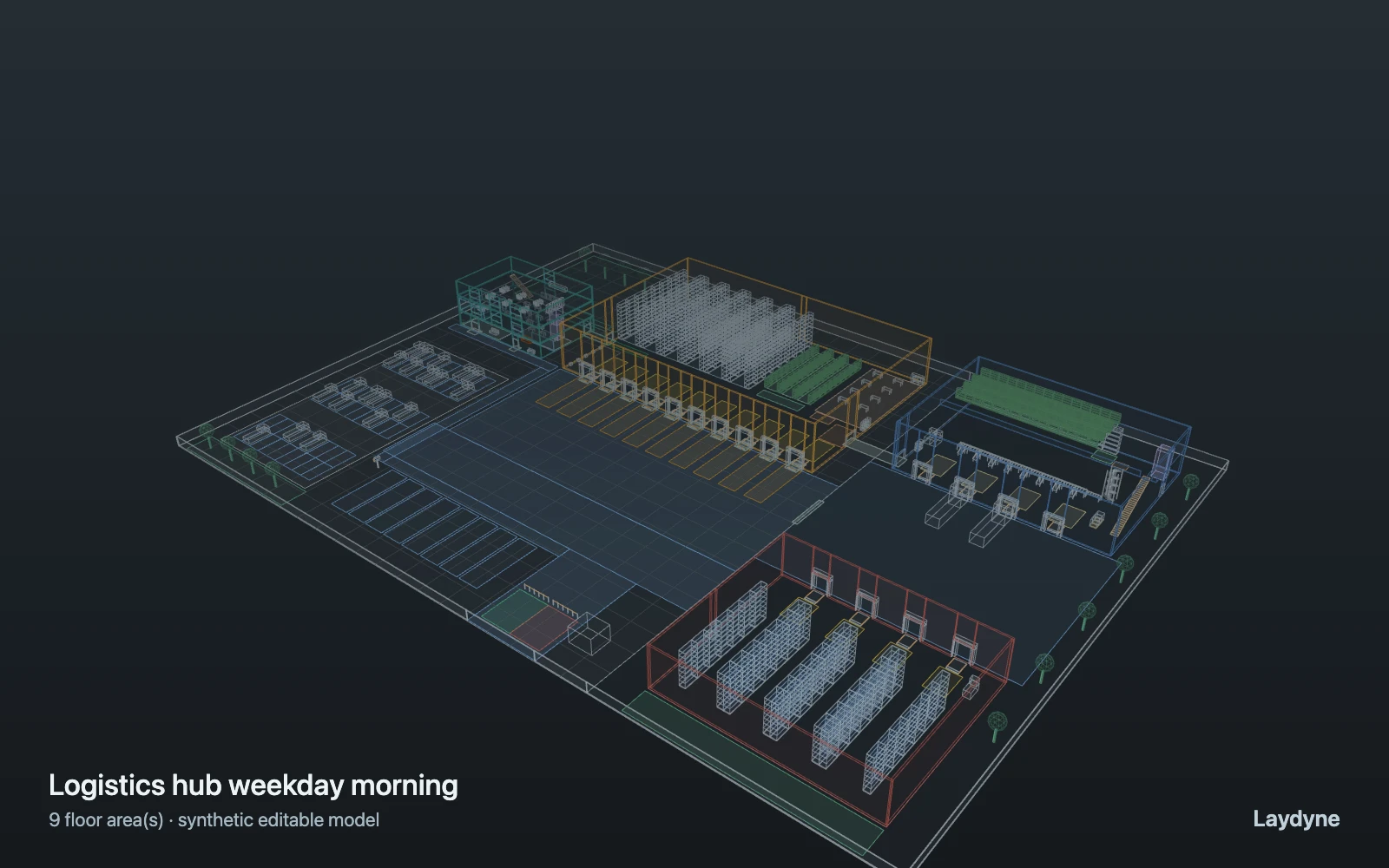
A weekday morning from 9:00 to 10:00 at a logistics hub, observed from 9:10 once the yard has filled. Inbound trucks arrive at 10 an hour, 22 an hour from 9:15 to 9:45; each takes a free waiting bay, its driver checks in at the office window (2 staff, 2.5 to 7 minutes), then it waits for one of the open dock doors (openDocks of 10) and is unloaded by one of 8 forklifts (10 to 25 minutes), which also put 30 received pallets an hour away into the racks. Six pickers fill 90 orders an hour into totes for 8 pack benches (the free bench first), a runner takes a packed roll cage to shipping every 5 minutes, and four mezzanine pickers feed 120 small orders an hour down the spiral to the sorter. Trucks are routed as circles, one per bay and dock; drivers do not walk; no breakdowns, shift change, yard traffic or costs. Figures are assumptions, not measured.
Change one thing
Open 6 or 10 of the dock doors instead of 8; give the check-in window a third person; cut the forklifts to 6; or raise the peak to 30 trucks an hour.
Read the consequence
The queue at the check-in window, trucks waiting in the yard for a dock, dock and forklift utilisation after the warm-up, and the work in progress at 10:00. Trucks are circles routed one per bay; yard traffic, drivers walking, breakdowns and costs are not modelled.
View the starting inputs
- Trucks per hour (off-peak)
- 10
- Trucks per hour, 9:15–9:45
- 22
- Inbound docks open
- 8
- Forklifts
- 8
- Check-in window staff
- 2
- Pallets put away per hour
- 30
- Pickers (Warehouse A)
- 6
- Orders per hour (Warehouse A)
- 90
- Roll-cage runners
- 2
- Mezzanine pickers
- 4
- Mezzanine orders per hour
- 120
Agent counts, routes and resource definitions are also saved in the project JSON.
02 / ACTUAL ENGINE OUTPUT
A reproducible starting result.
Means across 20 runs, seeds 11–30. Observation window 60 minutes.
| Scenario | Completed | Mean wait | Mean cycle | Blocked |
|---|---|---|---|---|
| Original scenario | 250 | 38s | 3m 58s | 0 |
Waiting averages cover arrived jobs, including unfinished waits; cycle averages cover completed jobs only. These are synthetic calculations, not measured store performance, revenue or a safety assessment.
Engine, status and output notes
process-des-2.4.0. Status: Original scenario: horizon_reached. “Completed” is the engine run status; check the blocked column for unreachable jobs.
- Connection c-side is 1.5 m wide, narrower than agent class forklift (1.8 m across), so that class cannot use it: widen it or leave its kind out of the class's links.
- Connection off-driver is 1.6 m wide, narrower than agent class forklift (1.8 m across), so that class cannot use it: widen it or leave its kind out of the class's links.
- The observation ended with work in progress: 24 jobs had not completed and 0 planned arrivals had not come (observation). Statistics cover 600 s to 3600 s.
- Job timelines are kept for the first 500 jobs and 1500 entries in all (traceLimit); result.jobs lists those jobs. Aggregate metrics include all jobs.
Engine inputs and saved comparisons stay with the downloaded project. Any limited trace affects playback details, not aggregate metrics.
03 / MAKE IT YOURS
Plan in 2D. Inspect in 3D. Keep the whole project.
- Open and adjust. Switch between 2D and 3D; edit a part, a floor or an input. Both views describe the same model.
- Connect your agent for free. Sign in, choose Connect AI and connect Codex or Claude Code. Ask it to inspect the example, edit the layout and check a route.
- Save a checkpoint. Export → Project JSON, or ask the agent to export the complete project. Import it later to restore floors, scenarios, saved comparisons and the selected view.
- Compare with Pro. Run an edited scenario or compare frozen options under the same demand. Pro also adds built-in AI and manual cloud saving.