Issue A3 plans, quantity sheets and a PDF report from the saved version
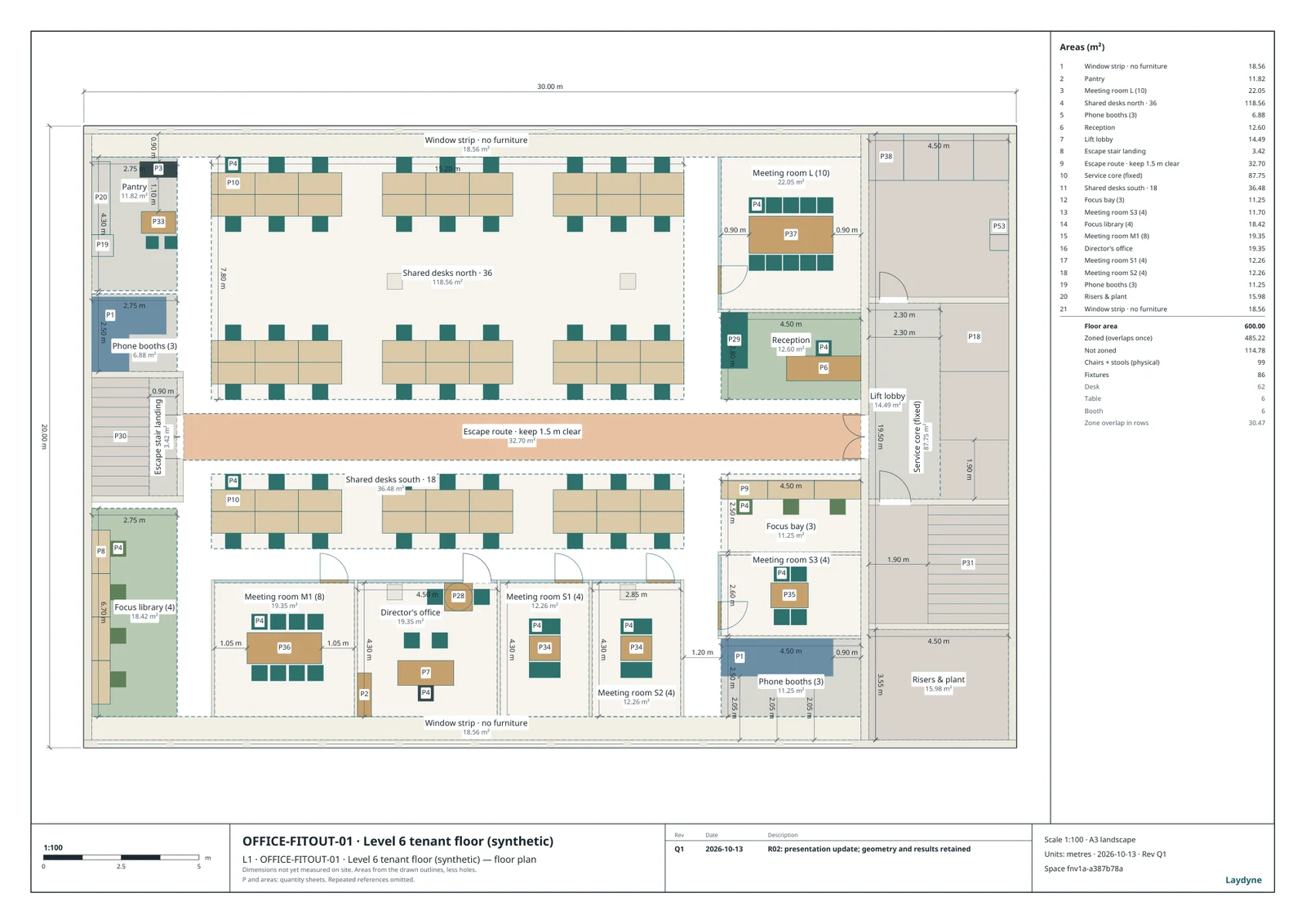
From the layout you saved, Laydyne issues scaled plans with dimensions and furniture references, quantity sheets with part ids and dimensions, and a searchable PDF report whose version in the title block matches the model.
How to use it
- Ask your AI for
issue_drawings: A3 sheets at a standard scale that fits the floor (1:100 in the office record) with a title block, a revision and an issue register;get_space_quantitiesreturns floor areas, zone areas and part counts by kind. - Change the layout and issue the next revision: the changed rooms are clouded, a revision table lists the issue, and the earlier revision reopens as sent.
export_reportwrites a self-contained HTML or PDF report, andget_proposal_packetcollects pictures, drawings, quantities, changes and assumptions into one HTML page that prints to PDF; both are free.- Download the office handover: an A3 plan at 1:100, four quantity sheets and the proposal report, all from the same saved R02.
What the published records produced
The published office handover is the R02 plan at 1:100 with furniture references, four quantity sheets with part ids and dimensions and a searchable proposal report; the Rev B drawing set of a three-floor fit-out shows the clouded changes, its revision table and its issue register as CSV; the shop record’s plans carry every part id in two schedule pages.
- R02 plan and quantity sheets (PDF)
- Proposal report (PDF)
- Rev B drawing set from the revisions record (PDF)
- Issue register (CSV)
- Shop plans and quantities, option D (PDF)
These recorded projects use synthetic inputs. Photos and drawings show what was produced; site accuracy, business effects and photorealistic reconstruction are not established.
What it does not do
- Export.
export_reportproduces self-contained HTML or PDF. PDF requires an open, connected Studio browser and preserves vector paths and selectable text with embedded fonts; embedded pictures remain images. Headless MCP supports HTML only. Keep the project JSON as the editable source. - The attendance, meeting and call patterns are synthetic. People walk circular routes without avoiding each other, meeting attendees do not reserve rooms, and the geometry checks do not establish fire or accessibility compliance. Furniture counts are drawn parts, not procurement quantities or prices. A different office needs its own inputs and its own comparison.
Price
Building and editing the model with your own AI over MCP, route checks, saving in this browser and JSON import and export are free, with no count limit; a free account is needed only to create an MCP link (3 per account). Running simulations, the built-in AI and cloud saving need Pro ($29 a month or $278.40 a year) or Max ($89 a month or $854.40 a year). Prices are in US dollars before tax; your AI provider bills its own usage separately.
Common questions
- What is on an issued sheet?
- Ask your AI for
issue_drawings: A3 sheets at a standard scale that fits the floor (1:100 in the office record) with a title block, a revision and an issue register;get_space_quantitiesreturns floor areas, zone areas and part counts by kind. - What happens when the layout changes after an issue?
- Change the layout and issue the next revision: the changed rooms are clouded, a revision table lists the issue, and the earlier revision reopens as sent.
- Does a PDF need Studio open?
- Export.
export_reportproduces self-contained HTML or PDF. PDF requires an open, connected Studio browser and preserves vector paths and selectable text with embedded fonts; embedded pictures remain images. Headless MCP supports HTML only. Keep the project JSON as the editable source. - What does it cost, and what is free?
- Building and editing the model with your own AI over MCP, route checks, saving in this browser and JSON import and export are free, with no count limit; a free account is needed only to create an MCP link (3 per account). Running simulations, the built-in AI and cloud saving need Pro ($29 a month or $278.40 a year) or Max ($89 a month or $854.40 a year). Prices are in US dollars before tax; your AI provider bills its own usage separately.