Change the model with the AI you already use
Connect ChatGPT, Claude, Codex, Claude Code or any MCP client to the Studio tab you have open: it reads the model, makes partial changes that keep every other part and its id, and you watch each change live, undo it, and reopen the saved project later.
How to use it
- Sign in to a free Laydyne account, add the MCP server https://laydyne.com/api/mcp/oauth to your client and keep Studio open in a browser tab; the client steps are in Connect an AI agent.
- Ask for the change in words: move reception beside the entrance, add two meeting rooms, widen an aisle to 1.2 m. The agent calls
edit_spacefor the parts involved; everything else keeps its position and id. - Every change appears in the Studio tab as it happens;
undo_space_editandredo_space_editstep back and forward, andget_change_loglists what changed. - Save a named browser project or export the JSON; another session, or another AI, reopens the same ids, layouts and saved comparisons.
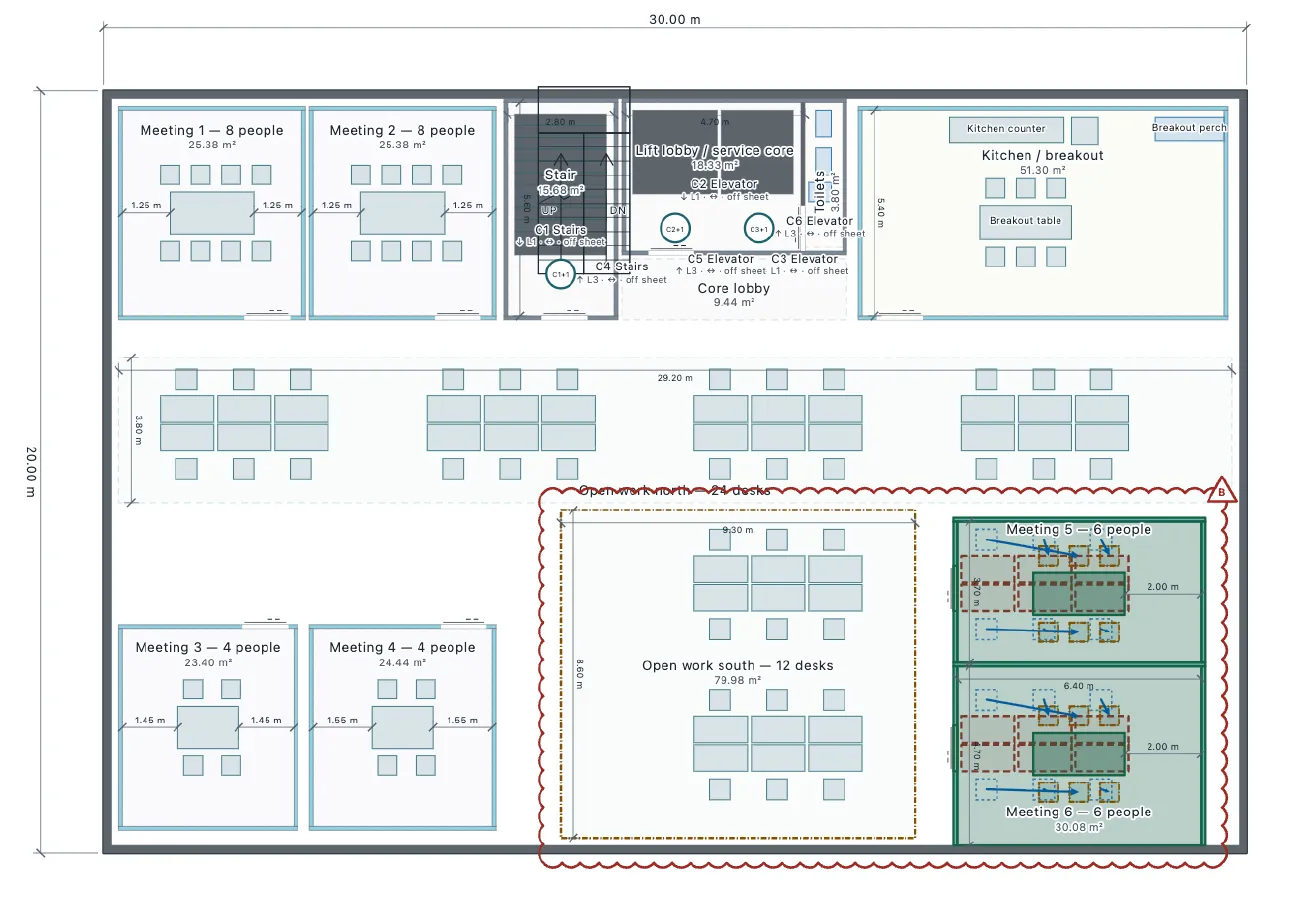
What the published records produced
In the office record, the client’s revision R02 moved reception beside the entrance and kept one director’s office while proposal B stayed saved, and the change drawing from B to R02 lists only what moved. In the drawing revisions record, Rev A was issued, the comments applied and Rev B issued with the changes clouded, each step one prompt.
- Change an existing office layout, compare the options and issue the revised drawings
- Editable project with A, B and R02 (JSON)
- Drawing revisions with your AI
- Changes from Rev A to Rev B (PDF)
- Change, compare and reopen a building
These recorded projects use synthetic inputs. Photos and drawings show what was produced; site accuracy, business effects and photorealistic reconstruction are not established.
What it does not do
- Your working project is saved in the browser. MCP links use a Laydyne server relay that temporarily stores tool requests and results for delivery; this is not cloud project saving. Experimental WebMCP lets a compatible browser agent call the free editing tools directly in the page without that relay or a Laydyne account. Neither path promises offline use: app loading, account and plan checks, and AI provider requests can still use the network. Your AI provider’s fees and data policies apply separately.
- No. Laydyne does not charge for the MCP connection or for the edits, checks and exports your agent makes. Your AI provider bills its own usage under its own terms; that cost depends on the model and on how much your agent reads and writes.
Price
Building and editing the model with your own AI over MCP, route checks, saving in this browser and JSON import and export are free, with no count limit; a free account is needed only to create an MCP link (3 per account). Running simulations, the built-in AI and cloud saving need Pro ($29 a month or $278.40 a year) or Max ($89 a month or $854.40 a year). Prices are in US dollars before tax; your AI provider bills its own usage separately.
Common questions
- Which AI can I connect?
- Sign in to a free Laydyne account, add the MCP server https://laydyne.com/api/mcp/oauth to your client and keep Studio open in a browser tab; the client steps are in Connect an AI agent.
- Does a change rewrite the whole model?
- Ask for the change in words: move reception beside the entrance, add two meeting rooms, widen an aisle to 1.2 m. The agent calls
edit_spacefor the parts involved; everything else keeps its position and id. - Can I undo what the AI did?
- Every change appears in the Studio tab as it happens;
undo_space_editandredo_space_editstep back and forward, andget_change_loglists what changed. - Does connecting my own AI cost extra?
- No. Laydyne does not charge for the MCP connection or for the edits, checks and exports your agent makes. Your AI provider bills its own usage under its own terms; that cost depends on the model and on how much your agent reads and writes.