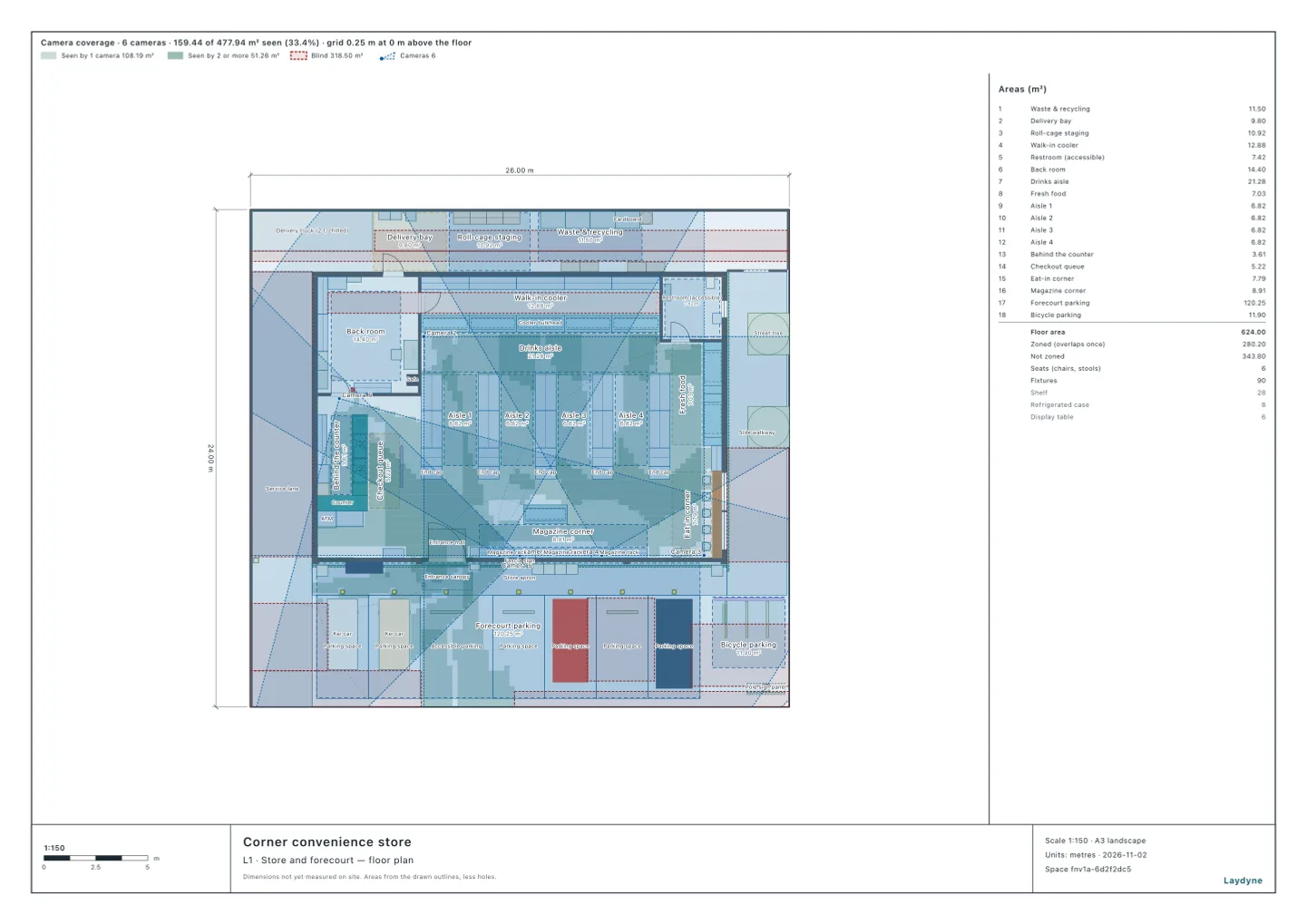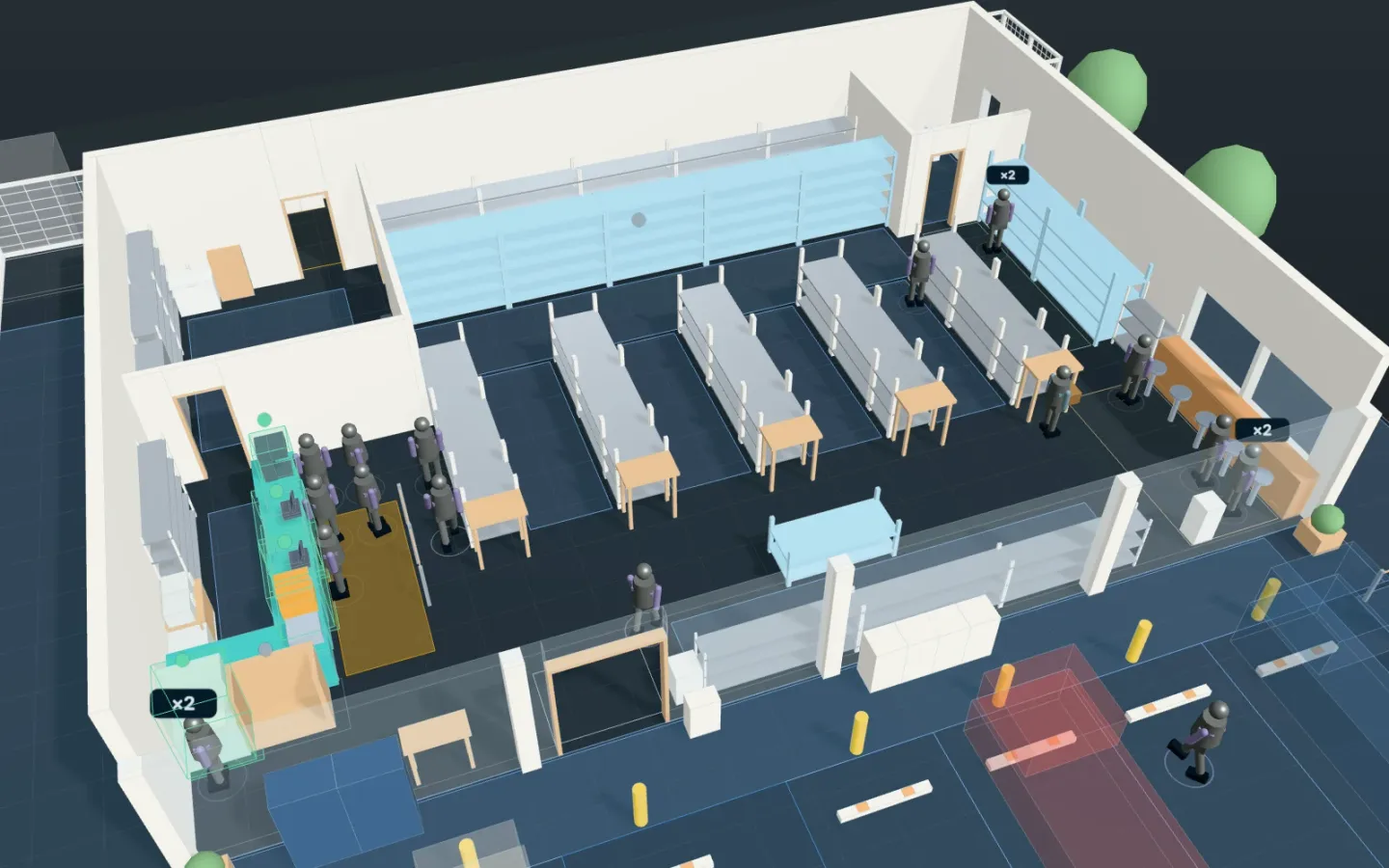
Open the convenience store model (no account needed; running the simulation needs Pro). How many security cameras does a store need, and where, so that the sales floor has few blind spots and the checkouts and the entrance are well covered? In this article, on a model of a convenience store, the AI has the tool suggest camera positions, counts how much is covered for each number of cameras, and checks what happens when shoppers stand in the way at lunch. It used the same tools an AI calls over MCP; every figure and picture below comes from those tools.
1. What was checked
A corner convenience store (a 26 × 24 m site, with a 20 × 14 m store building). The AI gave suggest_cameras these conditions:
- What must be covered: the sales floor’s areas (the four aisles, the area in front of the chilled cases, fresh food, the magazine corner, the eat-in area and the checkout queue) count once. The two checkouts and 1 m around them, the automatic door and 2 m around it, and the spot where a customer stands at the ATM (0.9 × 1.2 m) count three times.
- Where cameras may go: the walls and columns inside the store, 2.7 m above the floor (none on the forecourt or in the back yard). Directions every 15°, and downward tilts of 15°, 30°, 45° and 60°: 113 candidate positions.
- The camera: 90° across, 60° up and down, a range of 25 m (assumed).
- How it counts: for each point of a 0.25 m grid on the floor, whether it is in a camera’s view with nothing (shelves or walls) in between. Shelves, chilled cases and walls block the view; the glass storefront does not.
suggest_cameras adds the camera that covers the most first, then the next best (a greedy search), then swaps a camera for another while that covers more. The result is not a proven optimum.
2. Coverage by number of cameras
| Cameras | Share of what must be covered (weighted) | Area covered |
|---|---|---|
| 1 | 37% | 20.3 m² |
| 2 | 54.7% | 45.9 m² |
| 3 | 68.3% | 61.2 m² |
| 4 | 76.4% | 73.8 m² |
| 5 | 84.3% | 85.4 m² |
| 6 | 90.3% | 88.6 m² |
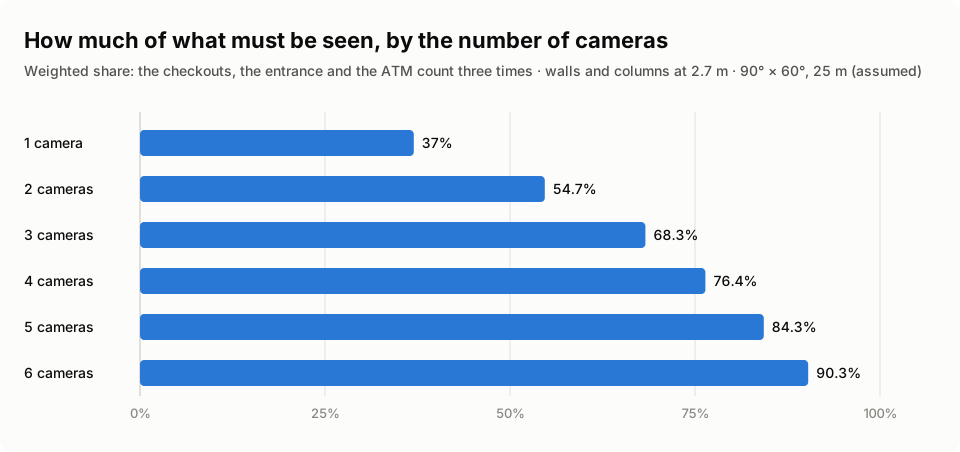
- The first camera looks down from above the storefront towards the west (the entrance, the ATM and the checkouts) and covers much of the weighted areas at once. From the second camera on, each adds less.
- After the six were chosen, two swaps took them to 91.9% (by area, 92.1 of 100 m², 92%).
3. Where the six go, and the blind spots left
| What must be covered | Area | Share covered |
|---|---|---|
| The four aisles | 29.8 m² | 92% |
| In front of the chilled cases | 19.3 m² | 96.1% |
| Fresh food | 7.1 m² | 100% |
| The magazine corner | 8.3 m² | 84.8% |
| The eat-in area | 6.9 m² | 80.9% |
| The checkout queue | 5.6 m² | 96.7% |
| The two checkouts and 1 m around them | 7.9 m² | 92.1% |
| The automatic door and 2 m around it | 18.3 m² | 92.2% |
| In front of the ATM | 1.3 m² | 80% |
- Four of the six go above the storefront glass: one looks west towards the entrance, and three look into the store. One looks across the sales floor from the back room’s wall, and one looks at the checkouts from the wall behind them.
- 8.0 m² is left unseen, in 32 places. The largest are a strip 0.5 m wide and 2.5 m long along the shelves of aisle 4 (1.3 m²) and a strip 0.25 m wide just below the storefront cameras (on the storefront side of the magazine corner). The blind spots lie in the shelves’ shadow and right below the cameras.
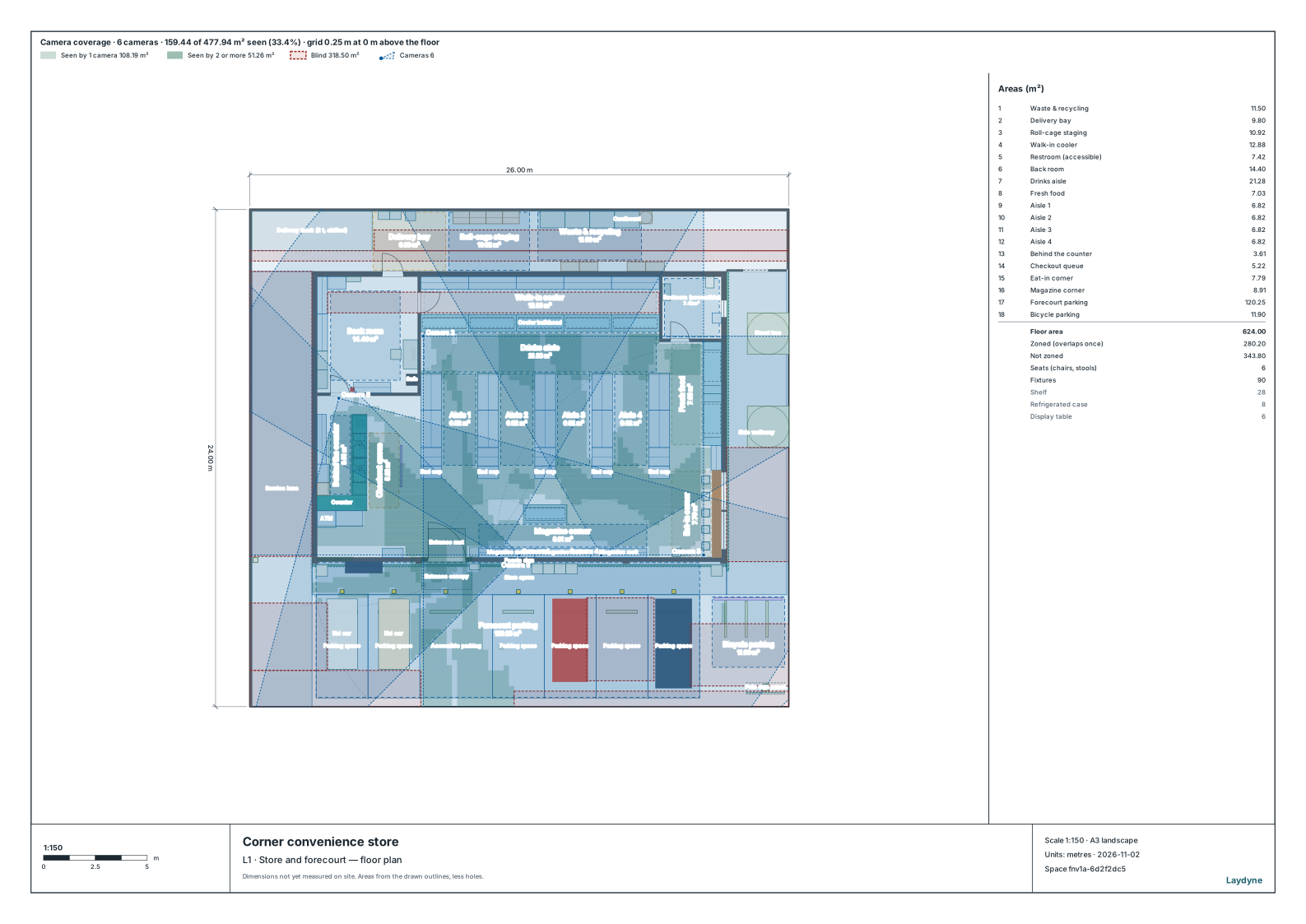
get_view_image draws the same coverage on the plan. The figures in the strip above the plan are for the whole site, including the forecourt parking and the back yard.
4. With the lunch crowd in the way
The saved lunch rush (shoppers arriving at 150 an hour for 35 minutes) was run, and get_visibility counted, minute by minute, how many of the people on the site (shoppers, staff and the delivery driver) had their heads in view of a camera, with the crowd taken into account. People hide others and the floor behind them, as upright prisms of their size.
- 87% of the people were seen on average, minute by minute. The fewest was at 4 minutes in: 4 of 8 people (50%).
- When the most people were there (18 minutes in, 19 people), 16 of them (84%) were seen.
5. How to use it, and what it does not tell you
- Before counting cameras, decide what counts for how much. Raising the weight of what must be covered (the checkouts, the entrance, the ATM) gives positions that favour them.
- Check the cameras you have. Placed as camera parts, the cameras already in the store can be measured for today’s blind spots (
suggest_cameraswith no new cameras, orget_visibility). The tool that solves a camera’s position and direction from a photo taken on site (solve_photo_camera) also gives the input that places it as a camera part. - Put up a notice. The Personal Information Protection Commission’s Q&A (Q1-13, in Japanese) says that a business taking images in which a person can be identified with a security camera should specify the purpose as far as it can and use the images within it, and, where people cannot easily tell that a camera is taking their picture, take steps such as a “security camera in operation” notice (Act on the Protection of Personal Information, Article 20(1)).
What it does not tell you:
- Whether a point is seen is counted from the view and the line of sight alone. Image quality, light, glare, and whether faces or hands can be told apart are not calculated (
suggest_camerascan also limit how far a camera counts as seeing by its resolution, in pixels per metre). - The cameras’ fields of view and range are assumed: check them against the models you have in mind.
- The store is illustrative: the sizes and numbers are examples.
Tools used
suggest_cameras: from what must be covered and its weights, where cameras may go and their lens, the positions, the share covered for each number of cameras, and the blind spotsedit_space: places the six suggested cameras as camera partsrun_process_scenarioandget_visibility: run the lunch rush and count, minute by minute, the people the cameras see with others in the wayget_view_image: draws what the cameras see, and the blind spots, on the plan