Start from the office floor model (free sign-up), or draw your own floor. The lift lobby, the reception, the open office: how many security cameras does an office need, and where? And do the whiteboards and screens in the glass-walled meeting rooms, or the toilets, come into view? In this article, on a model of an office floor, the AI has the tool suggest camera positions, counts how much is covered for each number of cameras, and checks what shows that should not. It used the same tools an AI calls over MCP; every figure and picture below comes from those tools.
1. What was checked
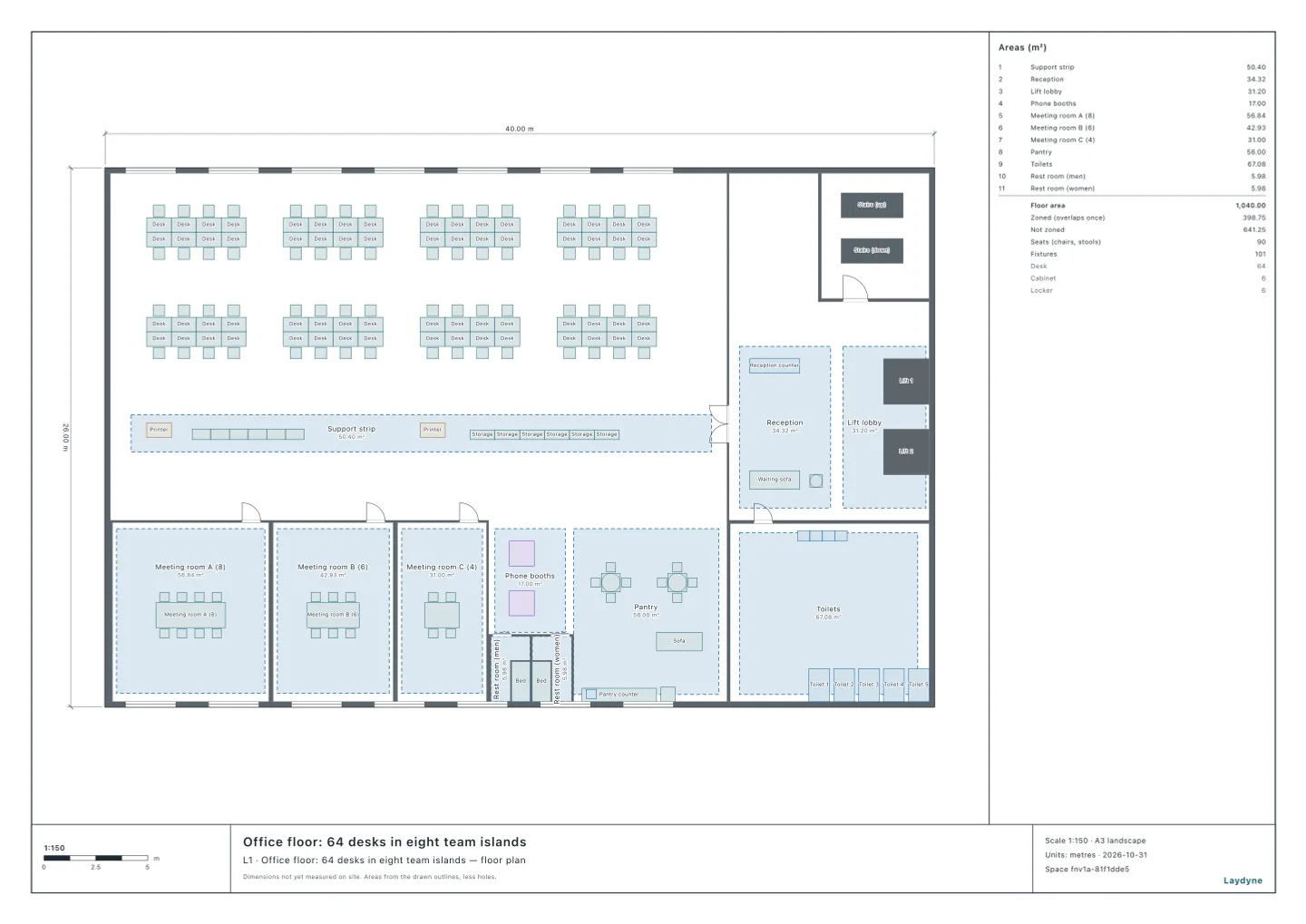
A model of an office floor (40 × 26 m): the open office with eight islands of eight desks (64 desks) on the west side and, beyond a glass wall to the east, the reception and the lift lobby, the stairs and the toilets. Along the south side are meeting rooms A (8 people), B (6) and C (4) behind glass partitions, phone booths and a pantry.
The AI gave suggest_cameras these conditions:
- What must be covered: the lift lobby and the reception count three times; the open office once.
- Where cameras may go: every 2 m on the ceiling (2.7 m above the floor); none above the meeting rooms, the phone booths or the toilets.
- The camera: an all-round camera looking straight down, 360°, with a range of 10 m (assumed).
- How it counts: for each point of a 0.25 m grid on the floor, whether it is in a camera’s view with nothing (walls, furniture) in between. Glass partitions and open doors let the view through.
suggest_cameras adds the camera that covers the most first, then the next best, then swaps a camera for another while that covers more. The result is not a proven optimum.
2. Coverage by number of cameras
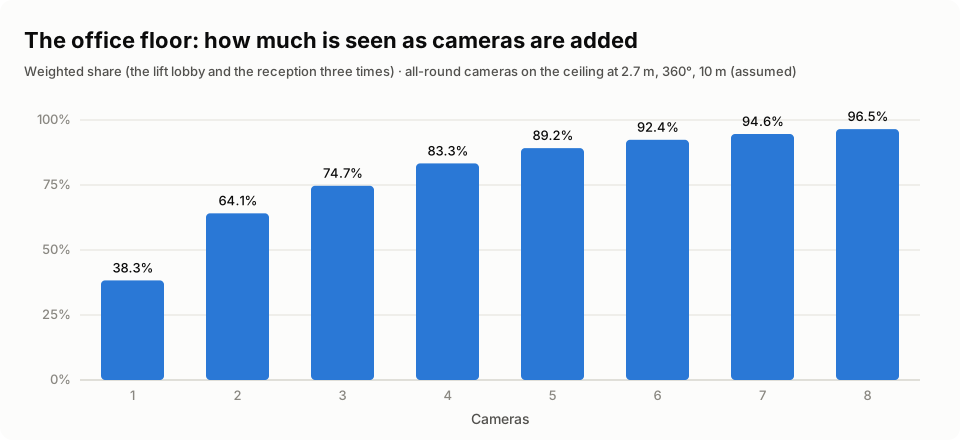
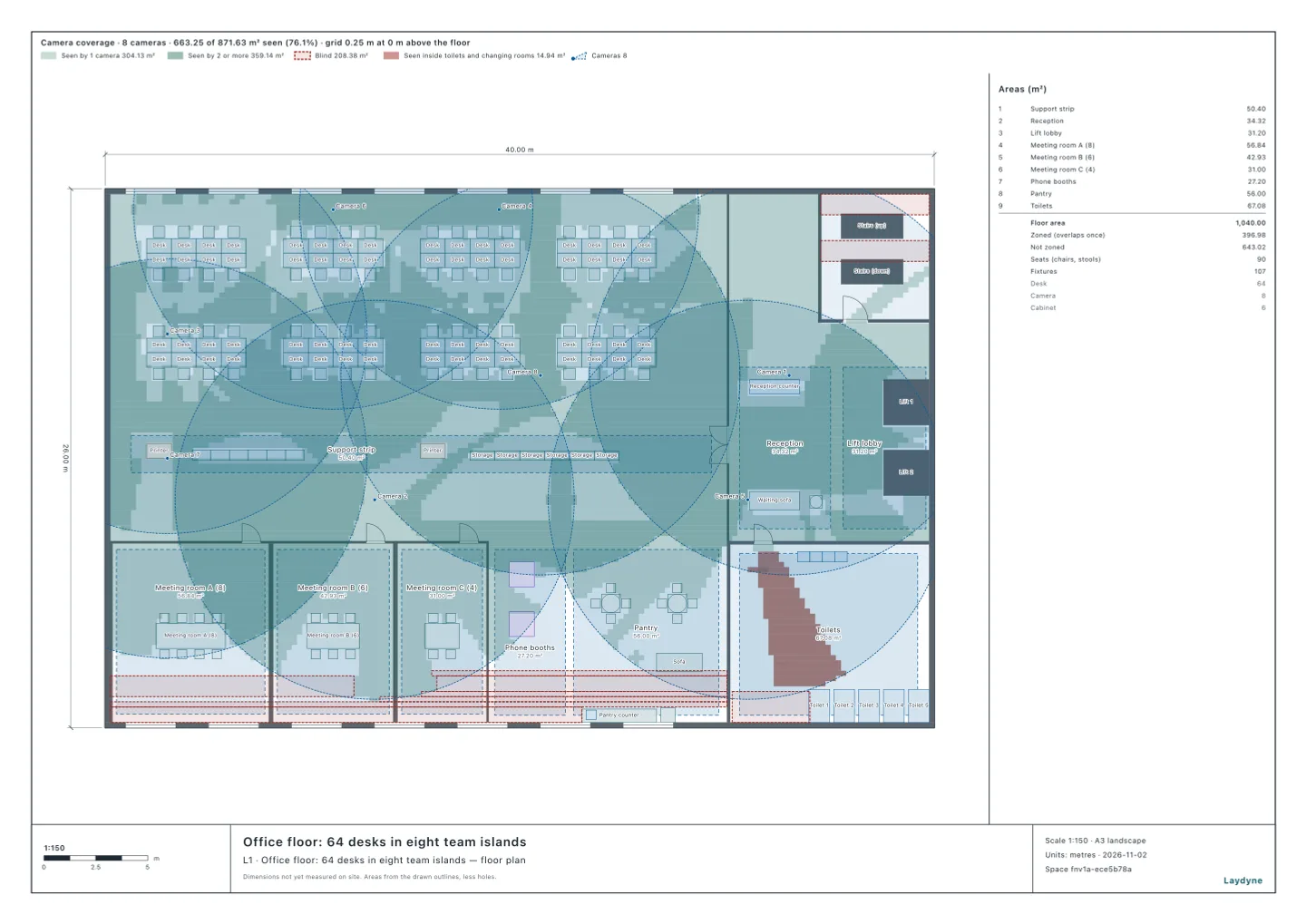
- Added one at a time: 64.1% with 2 cameras, 83.3% with 4, 92.4% with 6 and 96.5% with 8.
- After the eight were chosen, three swaps took them to 96.6% (by area, 96.6% of 476 m²).
| What must be covered | Area | Share covered (8 cameras) |
|---|---|---|
| The lift lobby | 23 m² | 96.7% |
| The reception | 31.3 m² | 97% |
| The open office | 422 m² | 96.5% |
The areas are counted on the 0.25 m grid, leaving out the floor under the desks and cabinets.
- Six of the eight cameras are above the open office and two above the reception.
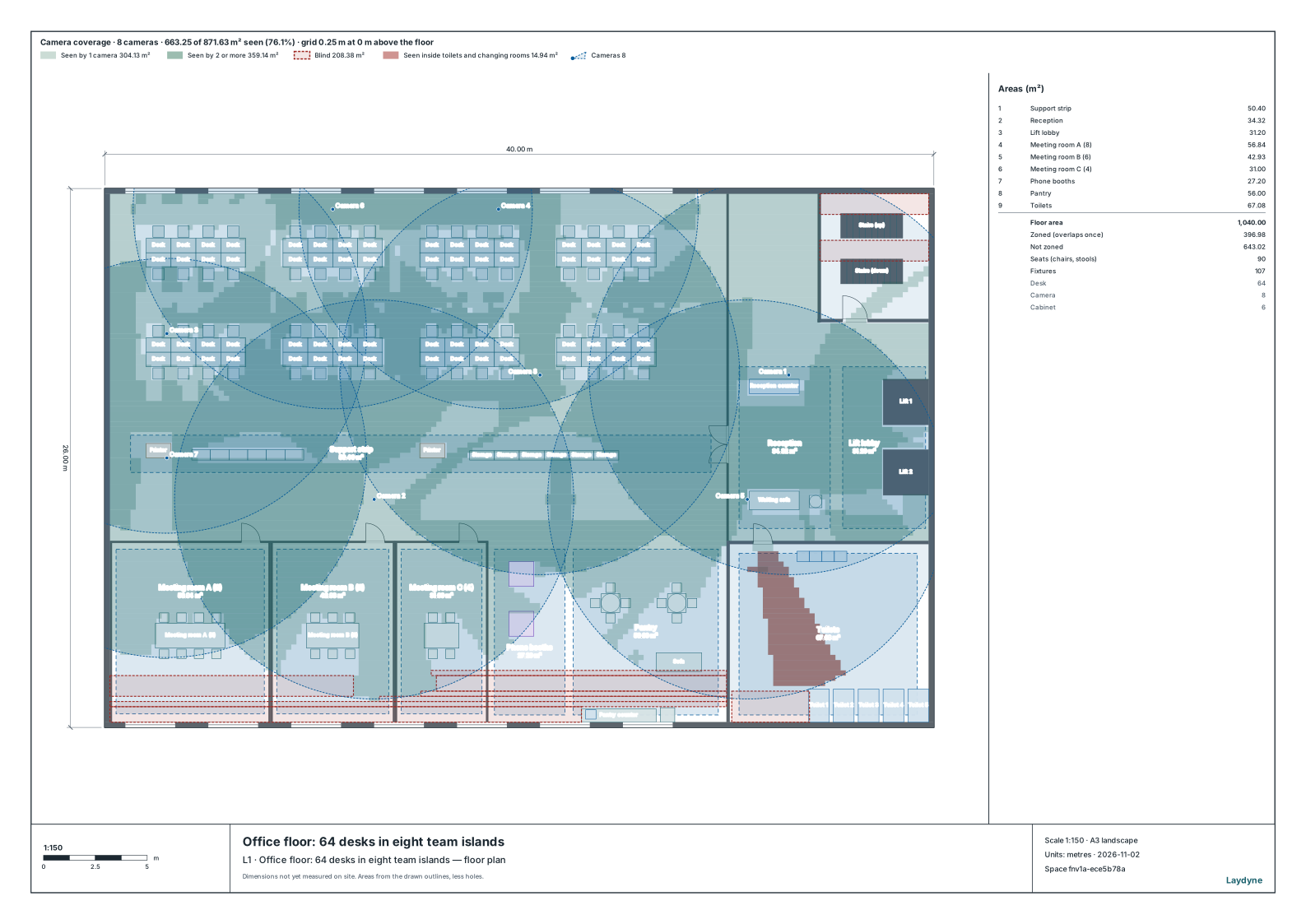
get_view_image draws what the eight placed cameras see. The figures in the strip above the plan are for the whole floor, including the meeting rooms, not only what must be covered. The red is what shows inside the toilets through the open door (“Seen inside toilets and changing rooms” in the legend).
3. Do the meeting rooms or the toilets show?
With the eight cameras placed, the AI measured the meeting rooms and the toilets (suggest_cameras can measure the cameras already placed without adding any):
| Room | Doors open | Doors shut |
|---|---|---|
| Meeting room A (8 people) | 59.4% | 59.4% |
| Meeting room B (6 people) | 67.6% | 67.6% |
| Meeting room C (4 people) | 67.1% | 67.1% |
| The toilets | 23.6% | 0% |
- Though no camera is above them, 59–68% of the meeting rooms shows through the glass to the cameras above the open office, whether the doors are shut or not.
- The toilets show 0% with the door shut, but 23.6% with it open. Measured one camera at a time, the one above the reception sees 23.4% on its own: a camera near the toilet door sees in through the open door. The suggestion’s summary says so too: 23.6% of the toilets shows once they are placed.
4. How to use it, and what it does not tell you
- Treat glass rooms as visible. A glass-walled meeting room is visible to the cameras outside it even with none inside. To keep whiteboards and screens out of view, move the cameras, or put privacy film or blinds on the glass (not calculated here).
- Mind the toilet door. If the door sometimes stands open, check the cameras near it. Measuring the placed cameras one at a time shows which one sees in.
- Put up a notice. The Personal Information Protection Commission’s Q&A (Q1-13, in Japanese) says that a business taking images in which a person can be identified with a security camera should specify the purpose as far as it can and use the images within it, and, where people cannot easily tell that a camera is taking their picture, take steps such as a “security camera in operation” notice (Act on the Protection of Personal Information, Article 20(1)).
What it does not tell you:
- Whether a point is seen is counted from the view and the line of sight alone. Image quality, light, and whether what is written on a whiteboard can be read are not calculated.
- All glass counts as clear, whether frosted or covered with film.
- People moving about and blocking the view are not counted.
- The cameras’ field of view and range are assumed; the all-round cameras’ “10 m” stands for how far their picture is good enough.
- The office is illustrative: the sizes are examples.
Tools used
suggest_cameras: from what must be covered and its weights, where cameras may go and at what height, and the lens: the positions and the share covered for each number of cameras, and how much of a room the placed cameras see (one camera at a time, too)edit_space: places the suggested cameras as camera partsget_visibility: checks what the placed cameras seeget_view_image: draws what they see, and the blind spots, on the plan