Build a 2D plan and a 3D model from a drawing, photos or a brief
Laydyne turns a dimensioned floor plan, a set of photos or a written brief into one editable model that you see as a 2D plan and a 3D view, with every wall, fixture and door as a part with its own id.
How to use it
- Give your AI the input: a floor plan as PNG, JPEG, WebP or PDF up to 5 MB, placed as a scaled underlay; photos with one known length; or a text brief with the rooms and fixtures you need.
- Your AI traces or places the parts over MCP with the free tools, sets the scale from a known dimension and states what the input did not show as an assumption.
- Run
check_space: passages narrower than 0.9 m, blocked doors and overlapping parts are listed with the parts involved, so the drawing’s own problems surface before anything is handed over. - Switch between the 2D plan and the 3D model in Studio, or open the two-building office sample to see the whole site, each level and its plan without signing in.
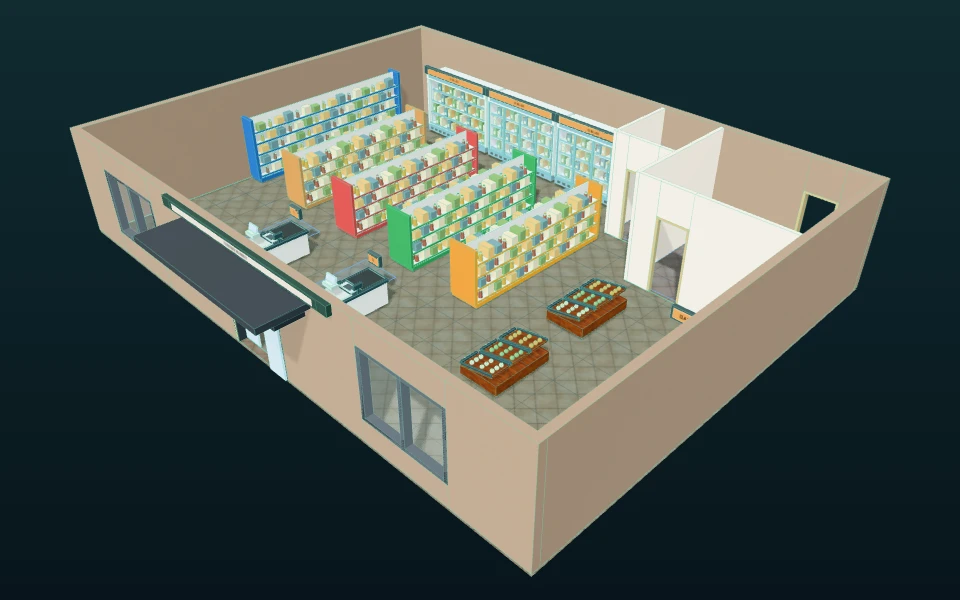
What the published records produced
In the published shop record, one 16 × 12 m plan became 34 parts whose positions matched the drawing with a median error of 5.4 mm, the checks found four problems in the drawing itself, and the set grew to A3 plans, quantities and a checkout simulation (the illustrated option D later grew to 88 parts). In the factory record, eight photos and one known length became a hall model with its reconstruction errors measured against the answer key.
- Drop in one floor plan, get the whole set, and catch what the drawing got wrong
- Shop plan and quantity schedules as drawn and revised (PDF)
- A factory model from eight photos, and how far off it was
- Factory hall drawing (PDF)
These recorded projects use synthetic inputs. Photos and drawings show what was produced; site accuracy, business effects and photorealistic reconstruction are not established.
What it does not do
- The plan and perspective views show the same editable spatial model. A floor can have a polygon outline and holes; a part can be a box or a polygon prism, rotated and raised above the floor. This is efficient for layouts and routes, but it is not a free-form mesh or detailed CAD model.
- DWG, DXF and IFC files are not imported.
- Dimensions read from photos and drawings are assumptions to check against measurements.
Price
Building and editing the model with your own AI over MCP, route checks, saving in this browser and JSON import and export are free, with no count limit; a free account is needed only to create an MCP link (3 per account). Running simulations, the built-in AI and cloud saving need Pro ($29 a month or $278.40 a year) or Max ($89 a month or $854.40 a year). Prices are in US dollars before tax; your AI provider bills its own usage separately.
Common questions
- What can I start from?
- Give your AI the input: a floor plan as PNG, JPEG, WebP or PDF up to 5 MB, placed as a scaled underlay; photos with one known length; or a text brief with the rooms and fixtures you need.
- Does Laydyne check the drawing?
- Run
check_space: passages narrower than 0.9 m, blocked doors and overlapping parts are listed with the parts involved, so the drawing’s own problems surface before anything is handed over. - Is the result a CAD model?
- The plan and perspective views show the same editable spatial model. A floor can have a polygon outline and holes; a part can be a box or a polygon prism, rotated and raised above the floor. This is efficient for layouts and routes, but it is not a free-form mesh or detailed CAD model.
- Can I import DWG or IFC files?
- DWG, DXF and IFC files are not imported.
- What does it cost, and what is free?
- Building and editing the model with your own AI over MCP, route checks, saving in this browser and JSON import and export are free, with no count limit; a free account is needed only to create an MCP link (3 per account). Running simulations, the built-in AI and cloud saving need Pro ($29 a month or $278.40 a year) or Max ($89 a month or $854.40 a year). Prices are in US dollars before tax; your AI provider bills its own usage separately.