Sign up free, then connect the ChatGPT or Claude you already use. Ask either whether a sofa fits in a room and, without a drawing, it can only guess. With Laydyne connected, your AI opens a model with real dimensions and works out the doors, the passages and the way in before it answers. No API key is needed, and Studio does not need to stay open.
The figures under “First requests” come from running the same tools your AI calls, from a fresh connection on a free account.
1. What you need
- A free Laydyne account (sign up).
- Claude: Free allows one custom connector; Pro and Max support them too. On an organization plan, an administrator adds the connector.
- ChatGPT: ChatGPT on the web with Developer mode. Which plans have it changes, so check the official page; in Business, Enterprise and Education workspaces an administrator turns it on. ChatGPT Free is not eligible.
- Gemini’s custom apps have Google’s own conditions (US only, 18 and over, a personal account and more).
2. Connect
Every app uses the same URL:
https://laydyne.com/api/mcp/oauthClaude
Customize → Connectors → + Add → Add custom connector. Name it Laydyne, enter this URL and press Continue. Under Authentication choose Sign in now, and under OAuth client choose Register automatically. Press Add, then turn it on from + → Connectors in a chat.
ChatGPT
Settings → Security and login → Developer mode. In Plugins, add a developer app with this URL and OAuth/DCR. Select it in the conversation’s Developer mode menu.
The names of screens and menus change as the apps are updated. These steps follow each company’s official page (checked on 26 October). In Studio, choosing your app under Connect AI shows the same steps and a link to the official page.
Approve
When the app opens Laydyne, sign in and press Approve. The approval page expires after 20 minutes; if it does, connect again from the app.
3. First requests
Once connected, the quickest start is a ready model. There are 35, from clinics and schools to venues, shops, factories and homes, and your AI can open any of them (those marked for a free account open with the account you connected). Each time it opens one, a single Undo brings back the work before it.
Can a wheelchair turn in the dental clinic?
In Laydyne, open the dental clinic model and check whether a wheelchair can turn.
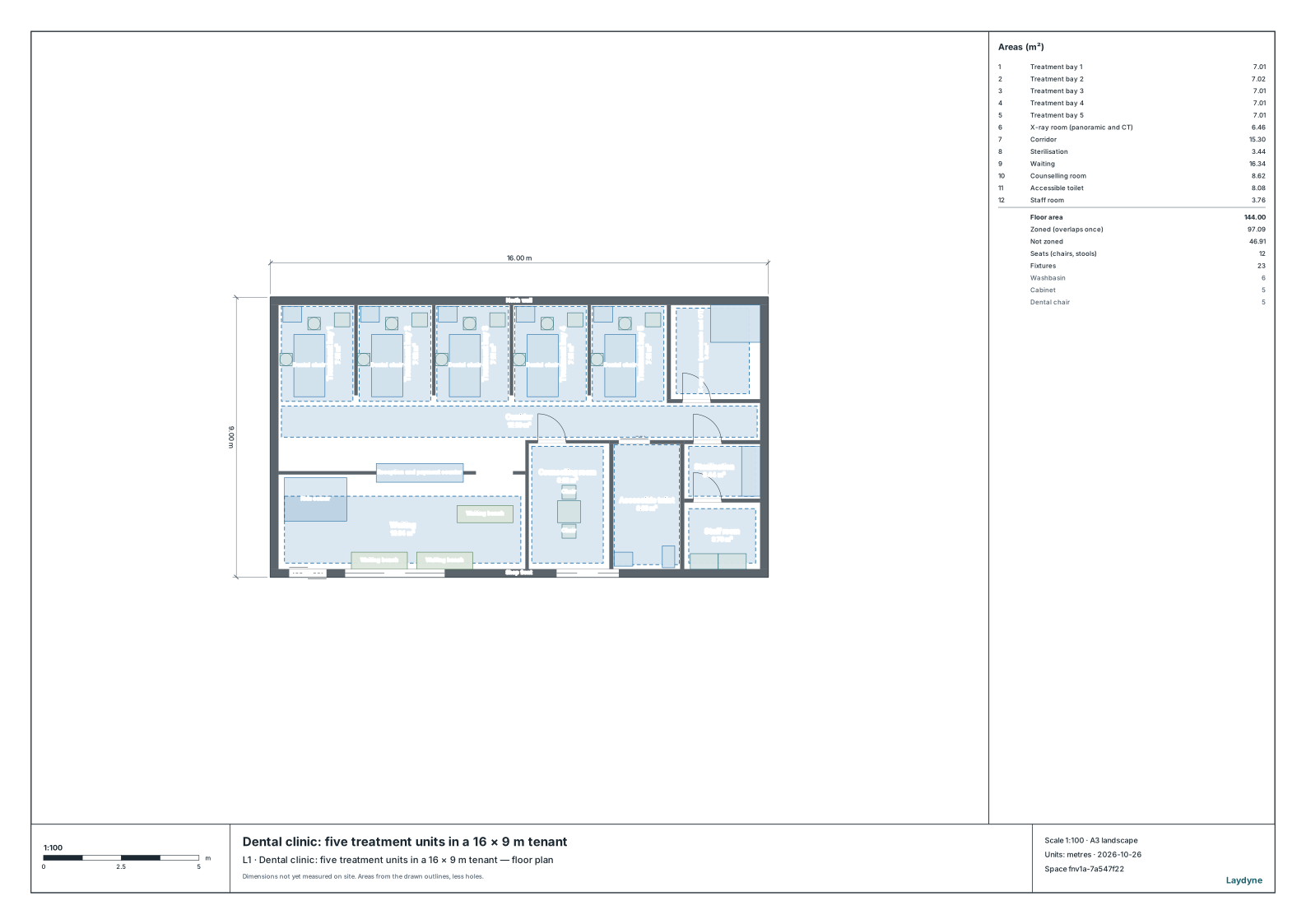
Your AI opens “Dental clinic: five treatment units in a 16 × 9 m tenant” (144 m², 79 parts) with open_ready_model, and check_space with turning tests whether a 1.5 m circle fits in each area marked for wheelchair users.
The result: a 1.5 m circle fits in the accessible toilet (the largest circle there is 2.1 m). The floor check found no issues. The dental clinic article goes on to make the counselling room a closed room and add a sixth unit.
Does the sofa go into the empty 2LDK?
Open the model of the empty 2LDK flat and tell me whether a 2.1 m three-seat sofa goes into the living room and a double mattress into bedroom 2.
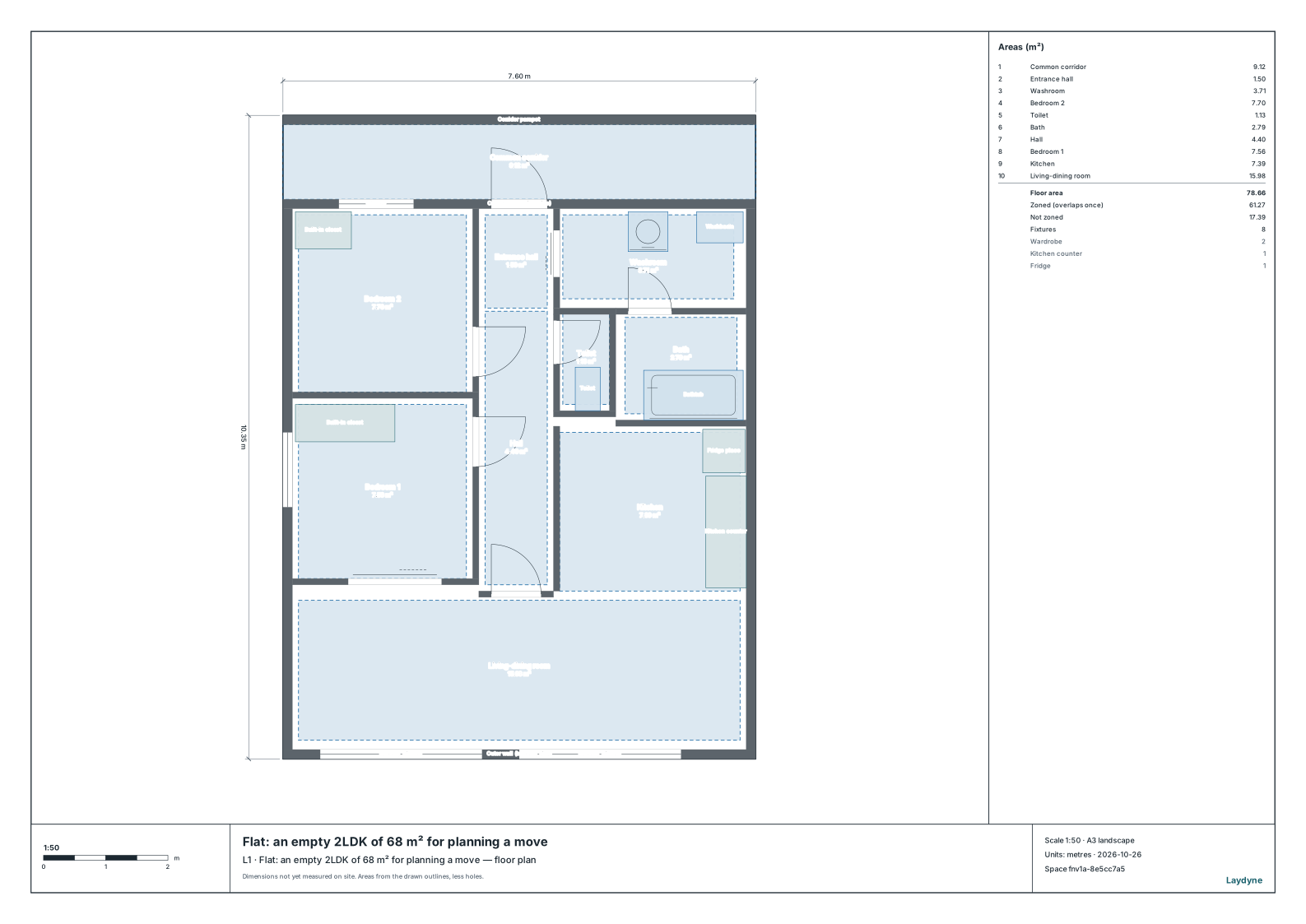
Your AI opens “Flat: an empty 2LDK of 68 m² for planning a move”, and check_space with carry moves each piece as a rigid box from the shared corridor outside the front door to its room.
| Piece | Result |
|---|---|
| Three-seat sofa (2.1 × 0.85 × 0.8 m) | Does not get in. Upright or on its back, it cannot turn from the corridor into the front door. Stood on its arm, it is 2.1 m high, too high for every doorway in the flat. |
| Double mattress (1.4 × 1.95 × 0.25 m) | Gets in on its back, through the front door and the door of bedroom 2, 4.3 m. |
The moving article has the rest of the furniture, and how to check the rooms once the pieces that fit are in.
Seat a wedding of 40
Open the small wedding for 40 and seat these guests: the couple at the head table, and tables for each family, university friends and work friends, with the tables named. Give me the seating list by name as well. (the guest list)
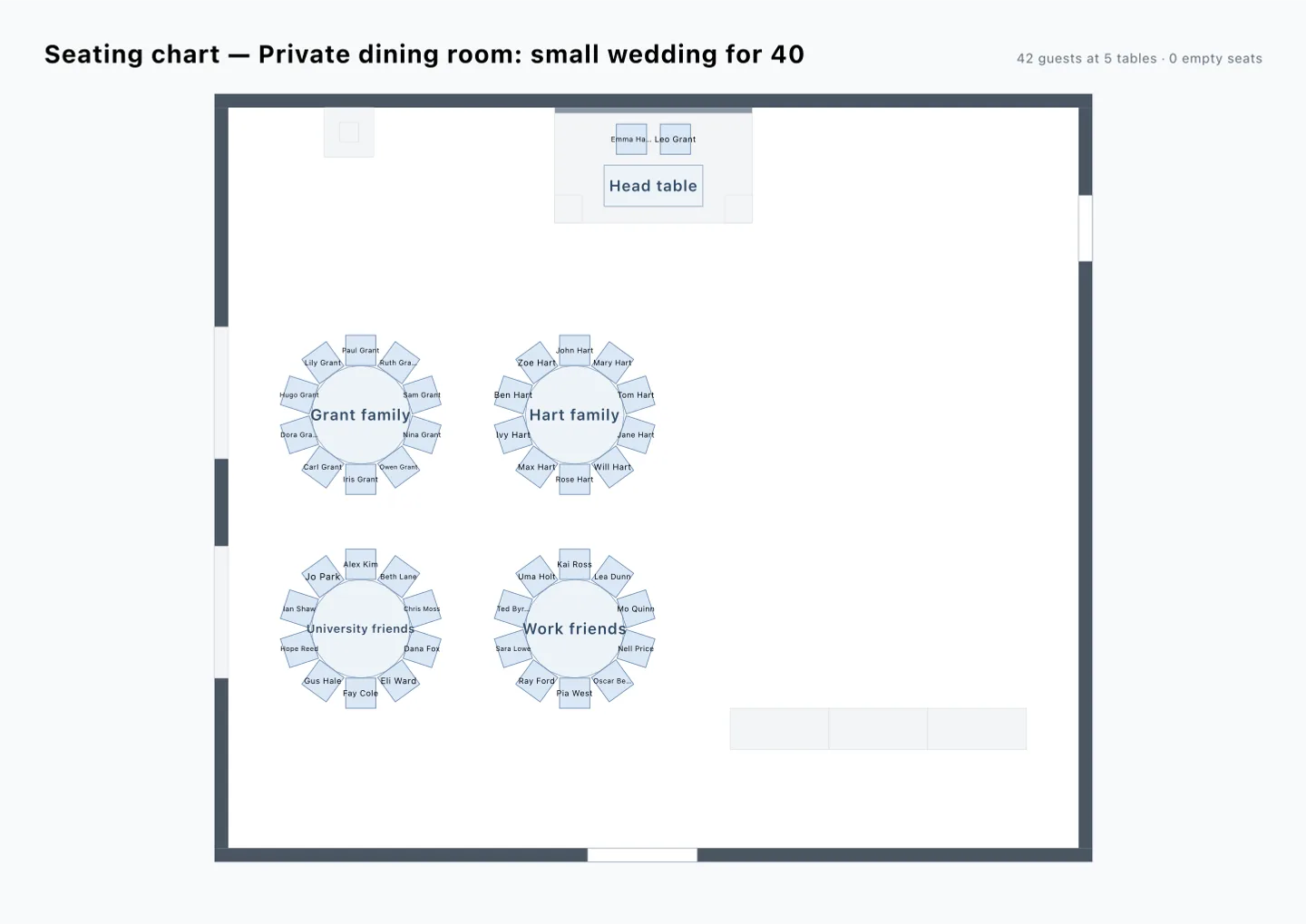
Your AI opens “Private dining room: small wedding for 40” (224 m²), seats the guests table by table with assign_guests, and gives the seating chart with get_seating_chart.
The result: the 42 seats of the head table for two and four round tables for ten are all taken. The tables are named Head table, Grant family, Hart family, University friends and Work friends. You get a CSV by name (for the reception list or escort cards) and a chart with a name on every chair (the picture at the top of this article). The floor check found no issues, and one Undo took the tables back to empty.
4. See the result and carry on
An AI you connect works in an AI workspace kept on Laydyne. In Studio, open Connect AI: the AI workspaces are listed there, and opening one shows the model as your AI left it, for you to change by hand.
- Pictures, 3D views and PDF files are made while that workspace is open in Studio.
- A free account keeps up to three AI workspaces (2 MiB each, 6 MiB in all). Every model in this article fits in one (the largest, the housing estate, is 0.6 MiB).
- A ready model is an example to start from, not your building. Ask your AI to replace its sizes with those of your drawings or measurements.
5. If something goes wrong
| What happens | What to do |
|---|---|
| The approval page says it has expired | Connect again from the app and press Approve within 20 minutes |
| A model for members does not open | Check that your AI is connected with your Laydyne account. An AI linked to a Studio tab that is not signed in opens only the other models |
| No pictures or 3D views | Open the AI workspace in Studio, then ask again |
| The app accepts only an API key or a bearer token | Use Create agent link in Studio |