Home / WORKED EXAMPLE
Estate weekday morning
Play a weekday morning on a four-block estate and see where people wait for the lifts.
Free to open, edit and save a file. Pro to run your changes. Opening a project asks before replacing your current space.
How do delivery boxes change the couriers’ time and lift use at the morning peak, and how long do residents wait for a lift?
- Who uses it
- Housing managers, estate developers and management associations
- How it can create value
- Compare delivery boxes with delivering to every door, and see the morning lift waits floor by floor, before deciding on delivery boxes, a lift upgrade or delivery rules. Shorter waits and rounds alone do not establish resident satisfaction or savings; weigh them against installation costs and real parcel volumes.
- Bring your site data
- Departures by floor and time of day, the lift’s speed, door times and control, parcel volumes by block and hour, the share that goes into boxes and how often nobody is home. Car sharing between floors and absent recipients need observation before trusting the waits.
01 / SETUP
A model you can inspect.
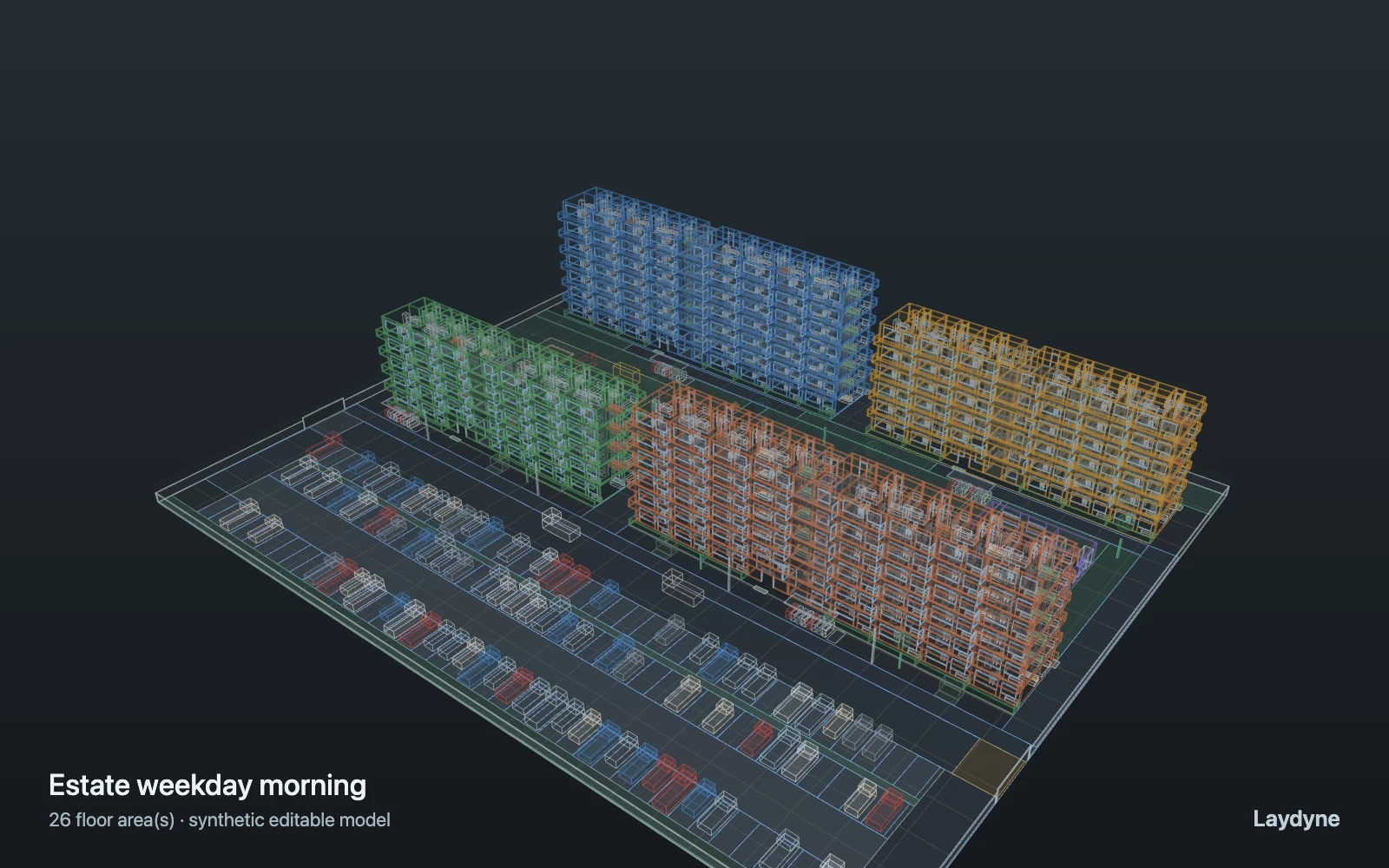
A weekday morning from 7:30 to 8:30 on a four-block estate. Residents leave their flats (poisson, 6 per floor per hour from 7:30 to 8:15 and another 6 from 7:40 to 8:00): from levels 1 and 2 on foot (down the stairs from level 2), from level 3 up by their block’s one lift. They line up at their floor’s lift hall; the car serves one party a trip, coming up from the lobby (1 m/s, 8 s of doors) and taking them down. A quarter put a bag in the nearest refuse cage; then 60 % walk to the east gate for the station, 25 % cycle from their block’s shelter and 15 % drive off from the car park. At 8:00 two couriers start from their vans (north: blocks A and B, south: C and D) with 4 parcels a block, each into the lobby’s delivery boxes or, by weight, up by lift to a random door and back down, queueing with the residents. Lift cars wait at the lobby between trips and do not stop on the way to take others; nobody is absent; walking and FIFO waits only: no car sharing, crowding, redelivery, satisfaction or costs.
Change one thing
With the same residents, put every parcel in the delivery boxes (boxes 100, doors 0) or take every parcel to the door (0 and 100); or raise the residents leaving per floor from 6 to 12.
Read the consequence
Lines at each floor’s lift hall and the lifts’ use, the couriers’ round times and their lift trips. Lift cars take one party a trip (no sharing between floors); absence, redelivery, satisfaction and costs are not modelled.
View the starting inputs
- Residents leaving per floor per hour (doubled 7:40–8:00)
- 6
- Parcels into delivery boxes (weight)
- 50
- Parcels taken to the door (weight)
- 50
- Parcels per block
- 4
Agent counts, routes and resource definitions are also saved in the project JSON.
02 / ACTUAL ENGINE OUTPUT
A reproducible starting result.
One run, seed 15. Observation window 60 minutes.
| Scenario | Completed | Mean wait | Mean cycle | Blocked |
|---|---|---|---|---|
| Original scenario | 166 | 16s | 2m 40s | 0 |
Waiting averages cover arrived jobs, including unfinished waits; cycle averages cover completed jobs only. These are synthetic calculations, not measured store performance, revenue or a safety assessment.
Engine, status and output notes
process-des-2.2.0. Status: Original scenario: completed. “Completed” is the engine run status; check the blocked column for unreachable jobs.
- No engine warnings.
Engine inputs and saved comparisons stay with the downloaded project. Any limited trace affects playback details, not aggregate metrics.
03 / MAKE IT YOURS
Plan in 2D. Inspect in 3D. Keep the whole project.
- Open and adjust. Switch between 2D and 3D; edit a part, a floor or an input. Both views describe the same model.
- Connect your agent for free. Sign in, choose Connect AI and connect Codex or Claude Code. Ask it to inspect the example, edit the layout and check a route.
- Save a checkpoint. Export → Project JSON, or ask the agent to export the complete project. Import it later to restore floors, scenarios, saved comparisons and the selected view.
- Compare with Pro. Run an edited scenario or compare frozen options under the same demand. Pro also adds built-in AI and manual cloud saving.